
Scientists confirm: This is the most effective way to get your cat’s attention, according to new research
Elderly Couple Refuses Reserved Seats—Viral Train Standoff Sparks Fiery Debate on Courtesy
According to many experts, the rising costs of DRAM and NAND significantly impact entry-level and mid-range configurations, where the increased cost constitutes a larger portion of the machine’s price.
In response, Geekom is increasingly opting for DDR4 over the more expensive DDR5. However, prices are still on the rise, and the A5 Pro is priced at around 600 euros. The company emphasizes that this configuration should ensure “five years of stability.” Let’s examine this claim…
Technical Specifications
| Model | Geekom A5 Pro |
|---|---|
| Dimensions | 112.4 mm x 112.4 mm x 37 mm |
| Processor (CPU) | Ryzen 5 7430U |
| Graphics Chip (GPU) | AMD Radeon Vega 8 |
| RAM (Memory) | 16 GB |
| Internal Memory | 512, 1024 GB |
| Wi-Fi Standard | Wi-Fi 6 (ax) |
| Bluetooth Version | 5.2 |
| Operating System (OS) | Microsoft Windows 11 Pro |
| Product Details |
The review was conducted with a product loaned by Geekom.
The Mini Mac Design Continues to Inspire
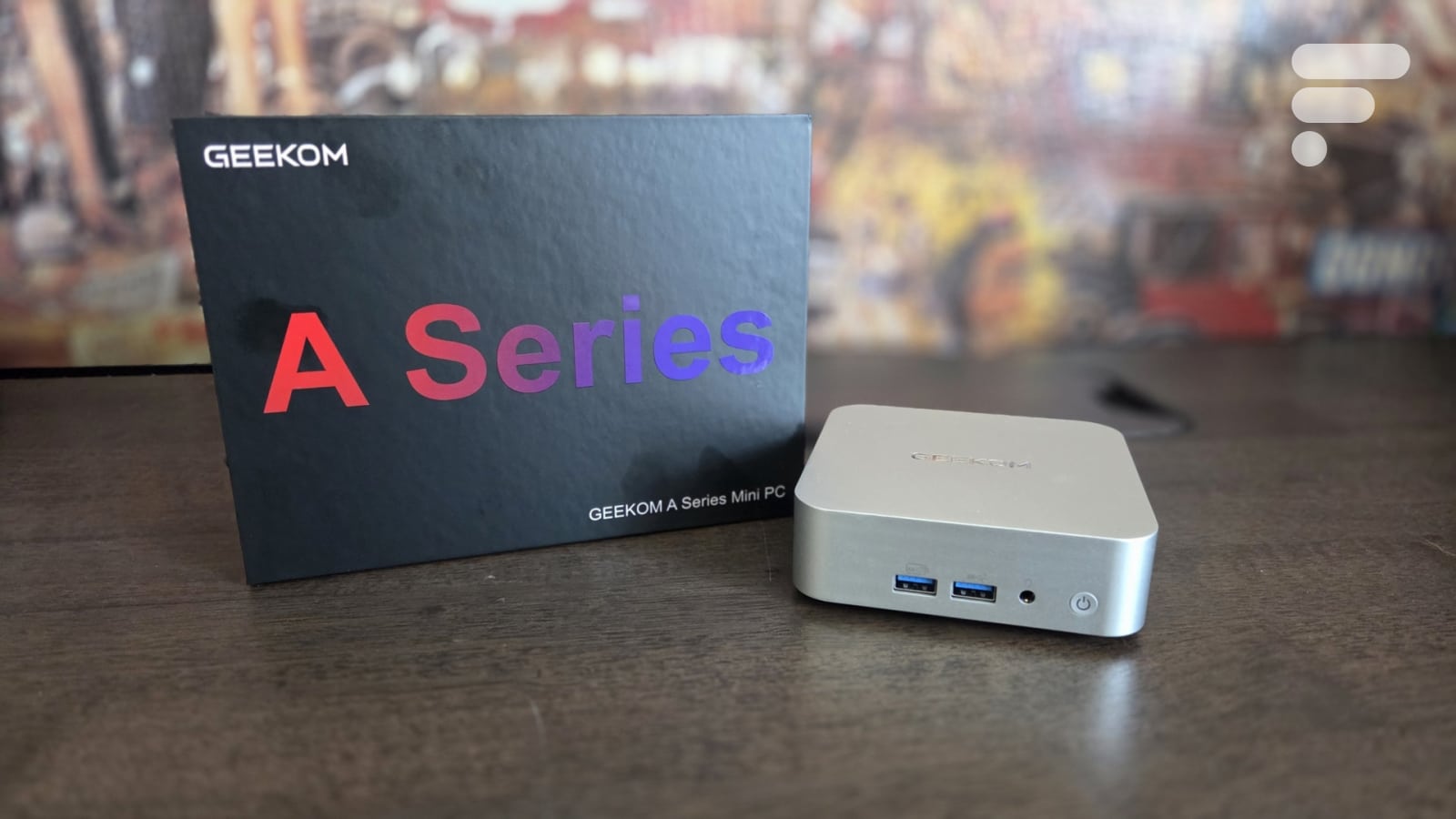
Having tested many mini-PCs and Geekom products, it’s clear that the Apple Mac mini design influence is evident. While there are certain Windows-specific features, the A5 Pro maintains a completely silver-gray look and a slightly “squashed” compact format. The mini-PC is notably tiny at just 112.4 millimeters per side with a square base.
At a slim thickness of just 37 mm, the volume is less than 0.5 liters. It’s hard to get much more compact than that. Additionally, it weighs barely 420 grams, and there’s no bulky power brick included. As usual, the power supply is external but measures only 106 x 46 x 32 mm and weighs about 230 g for a 65-watt output. The whole setup can easily be placed just about anywhere.
Returning to the mini-PC itself and its design, the A5 Pro cleverly combines a metal structure with plastic parts: the cover is aluminum, several chassis elements are steel, and the base, which covers the machine, is made of plastic. The assembly is high-quality although there are a few practical criticisms we’ll touch on during the disassembly.
Up to Four Displays, but No USB4
At first glance, those who favor abundant connectivity might be disappointed: the front is somewhat sparse and not very modern. Besides the essential power button (which includes a control LED), there are only three ports available: an audio jack combo for microphone/headphones and two USB ports. These are USB 3.2 Gen 2 (10 Gbps), but Type-A.
Only two USB ports on the front, no Type-C, and no USB4. Unfortunately. On the left side of the mini-PC, Geekom includes a memory card reader. While not the most crucial feature, it’s a nice addition. On the right side, there’s nothing but a ventilation grille, so we turn our attention to the back of the A5 Pro for additional connectors.
First disappointment, the power supply still does not connect via USB-C. Networking is handled by a 2.5 GbE RJ45 port, and a pair of USB Type-A ports are also present: 1x USB2 (480 Mbps) and 1x USB3.2 Gen 2 (10 Gbps). Most importantly, display connectivity is managed by four connectors: 2x HDMI 2.0 (4K @ 60 Hz) and two USB-C. In 3.2 Gen 2, they combine multiple functions: data transfers (10 Gbps), peripheral connections, and screen management via DisplayPort compatibility.
Bare Minimum for Accessories
The lack of USB4 in the connectivity options is undoubtedly disappointing, and unfortunately, Geekom isn’t boosting its reputation with its accessories. However, to be fair, all mini-PC manufacturers are in a similar position… more or less.
Geekom offers everything needed for a standard VESA mount with the metal support, screws, and, especially, the holes in the chassis of the A5 Pro. This VESA mount allows, for example, attaching the mini-PC to the back of a monitor to save even more desk space. It’s not much, but too many mini-PCs forget this option.
Lastly, alongside these minimal accessories, Geekom provides the bare essentials. In the box, alongside the A5 Pro, you’ll find the power brick, a power cable (≈2 meters), an HDMI cable (≈1.8 m), a thank you card, and a brief user manual. This manual isn’t anything special, but it summarizes the essential information about the machine.
Windows 11 Almost Ready Out of the Box
Whether it’s mini-PCs from AceMagic, Beelink, Geekom, GMKtec, or NiPoGi, to name a few, they all come with Windows 11. It’s unclear how Microsoft has managed to dominate this market, but no Linux option is offered.
Upon the first boot of the A5 Pro, it is always advisable not to connect any network (wired/wireless) to complete the preinstallation process more quickly. Like all its machines, Geekom ships a preinstalled version of Windows 11. It’s not a trial version, and you won’t get that “please activate your Windows” message a few days after your purchase. However, a finalization step is necessary.
Windows 11 asks a few questions, completes some settings, and after a restart, you’re on the OS desktop, almost ready to work. “Almost”? Yes, Geekom can’t perform miracles, and a phase of updates is still necessary, especially for the AMD drivers (chipset/graphics) to ensure optimal performance. Naturally, some Windows updates are also needed.
To conclude, although no Linux option is offered by the brand, Geekom also does not include any bloatwares, at least nothing beyond what is already integrated into Windows. Bloatwares are those software that only serves to clutter the machine and are often uninstalled at the first boot.
So, How Does It Perform in Use?
Perhaps with the arrival of new Intel generations, things will change, but for now, like nearly all manufacturers, Geekom still largely relies on AMD to power its most versatile mini-PCs. The A5 Pro is no exception with its Ryzen 5 7530U, although we won’t see it when opening the machine, you’ll soon understand why.
Firstly, it’s worth noting that Geekom maintains its four anti-slip pads to hide the screws under the PC. It’s aesthetically pleasing, but it’s regrettable that we’re forced to “rip” the pads off, which will not adhere very well if done dozens of times. Then, you can remove the four screws and open the chassis. Be careful, the WiFi antenna is attached to the cover, and the cable is short. You need to be gentle to avoid risking unplugging it: it can be reconnected, but it’s not very convenient. It’s a shame then that Geekom doesn’t copy some of its competitors a bit more.
You need to remove four more screws to free the metal protection/dissipation plate, and we can discover the innards of the A5 Pro… well, part of it. On the left, the two SO-DIMM slots are populated with 8 GB DDR4-2666 modules. On the right, you can see the NVMe SSD in the M.2 2280 format: it is topped with a thermal pad and it covers the M.2 port dedicated to the WiFi/Bluetooth card as well as the memory card reader. There’s also another M.2 port, in the 2242 format this time: it allows connecting a second NVMe SSD.
However, we are not able to present you the Ryzen 5 7530U: it would require dismantling the entire PC, removing the CPU’s cooling solution, and the motherboard. It’s doable, but not particularly interesting since the CPU is soldered to the board and cannot be replaced. It features 6 cores in Zen 3 architecture and can boost up to a 4.5 GHz frequency. It’s supported by 16 MB of L3 cache in addition to 512 KB of L2 cache per core. More importantly, it features a Radeon Graphics (Vega 6) solution with 7 graphic cores boosting to 2 GHz and capable of handling up to 2 GB of memory.
This solution is particularly important as it is not possible to connect a dedicated internal or external graphics card. Thus, it is the Radeon Graphics that will have to manage the display and, to immediately put it to the test, we confronted it with 3DMark, a handy measurement tool with its varied scenes. Unsurprisingly, the Radeon Graphics does not perform miracles, and on Steel Nomad (the heaviest scene), it only reaches 176 points. Fortunately, it’s more reassuring on Time Spy Extreme (539 points) and especially on Fire Strike (3030 points). One thing is already clear: the A5 Pro will not allow for “heavy” video gaming.
If you’re familiar with our mini-PC tests, you know we always put the machines up against demanding games, although not the most modern ones. We once again use Forza Horizon 5 and Shadow of the Tomb Raider, setting them to 1280 x 720 with two measurements depending on whether the detail level is at the minimum or maximum. As expected, at the highest levels, it’s absolutely unplayable at respectively 14 and 24 frames per second.
However, all hope is not lost and by switching to the lowest level of details, we achieve something more acceptable. Beware, at only 48 fps on Shadow of the Tomb Raider and 55 fps on Forza Horizon 5, it’s not great, but less demanding players might be content with this, and it’s especially promising for even lighter/older titles as well as most indie productions.
Here, we always continue with several tests of “smaller games” that are no less fun than the big ones and will give a real playful dimension to this A5 Pro. Our favorite indie productions – Horizon Chase Turbo, Tricky Towers, Unpacking, or Unrailed – run without any issues, and we have pushed the graphic details to the maximum. Better yet, we were even able to enjoy the races in split screen with four players simultaneously. Moreover, the A5 Pro will be comfortable for emulation… as long as you don’t want to play Switch games!
The playful aspect is one thing, but it’s also important to see what the A5 Pro has under the hood for more “professional” tasks. As expected, we shouldn’t expect miracles here either, but the CPU power of the Ryzen 5 7530U is quite decent. Thus, on Cinebench 2024, the 85 points in single-core are really light, but the 407 points obtained in multi-cores are more convincing.
To support the Cinebench 2024 results, we continue with the results on PCMark. This generalist tool has the good sense to simulate numerous activities from simple office work to 3D modeling through photo editing, video editing, or video-conferencing. Unsurprisingly, the graphic solution significantly handicaps the result in digital content creation (4966 points), but the other two tests are very convincing: 8022 points in essentials and 13116 points in productivity make the A5 Pro suitable for a wide range of tasks despite its 16 GB of RAM. You will simply need to be careful not to focus too much on the graphic part.
Finally, we always conclude the performance evaluation of a mini-PC with a little tour of the disk subsystem. Here, we note that the SSD does not come from a brand known in France. Nevertheless, it is a 1 TB model in PCIe Gen 3 x4, which should ensure good performance. At 3.7 GB/s in reading and 3.4 GB/s in writing, it’s indeed very correct and largely sufficient for all the uses already mentioned.
It’s also worth noting that during the two weeks of intensive use that preceded the publication of this test, the A5 Pro never let us down. The 16 GB of RAM are enough for a comfortable experience, and the whole machine was always very responsive.
Consumption and Heating
A solution as compact as the A5 Pro – less than 4 cm thick – inevitably raises questions. Isn’t the processor at risk of overheating? Could the cooling system be noisy in order to dissipate the heat? Geekom reassures us, particularly mentioning an “intelligent fan control” as well as a “dual copper heat pipe.” But practically speaking, what does that mean?
Frankly, we were pleasantly surprised. Of course, no miracle occurs, and during the heaviest loads, the ventilation is audible, but nothing catastrophic, just a simple, not too high-pitched blow. This is all the more appreciable as the CPU never exceeded 80 °C even during the most severe demands: it generally hovered around 70 °C in regular use. It’s warm, but neither alarming nor sufficient for the fan to ramp up.
All in all, the A5 Pro is thus a relatively discreet machine that is not likely to prematurely reduce the lifespan of its components: 44 °C measured on the SSD and 47 °C on the RAM, nothing to worry about. Finally, and importantly, we noted a certain energy frugality: generally, consumption is around 25 to 30 watts with a peak at 36.1 watts on our heaviest test. Not bad at all!
Price and Availability
Like all other PC manufacturers, Geekom faces rising prices for RAM and SSDs. That’s why most mini-PCs are now offered with a maximum of 16 GB of RAM, and the A5 Pro even reverts to DDR4.
Geekom A5 Pro
at the best price
-
Amazon
619 €
Despite these decisions, Geekom is unable to maintain prices as low as it used to, and the A5 Pro is still priced at around 600 euros. However, it’s possible to find promotions that bring it down to 550 or 560 euros. Frankly, given the current situation, these are interesting prices. Proof that the brand doesn’t have much room to maneuver, there are no options to save money with less RAM or a smaller SSD.
However, it’s worth noting that Geekom offers another version of the A5 Pro equipped with a Ryzen 5 7430U, the model
Similar Posts
- Geekom A9 Max Review: Is This Mini-PC the Ultimate Power-to-Cost Champion?
- Geekom A7 Max Review: Small Size, Big Performance – Don’t Be Fooled!
- Geekom A9 Max 2026 Review: Mini-PC Upgrades to Ryzen AI 9 HX 470 Power!
- GMKtec EVO-T1 Review: Intel’s Latest Mobile Processor Gives It a Serious Edge
- Minisforum MS-03 Review: Panther Lake Unleashed: Triple 10 GbE & Dedicated GPU Slot!

Maya Singh is a senior editor covering tablets and hybrid devices. Her work explores how these tools reshape digital productivity and learning. She also contributes to feature editorials on emerging tech.