
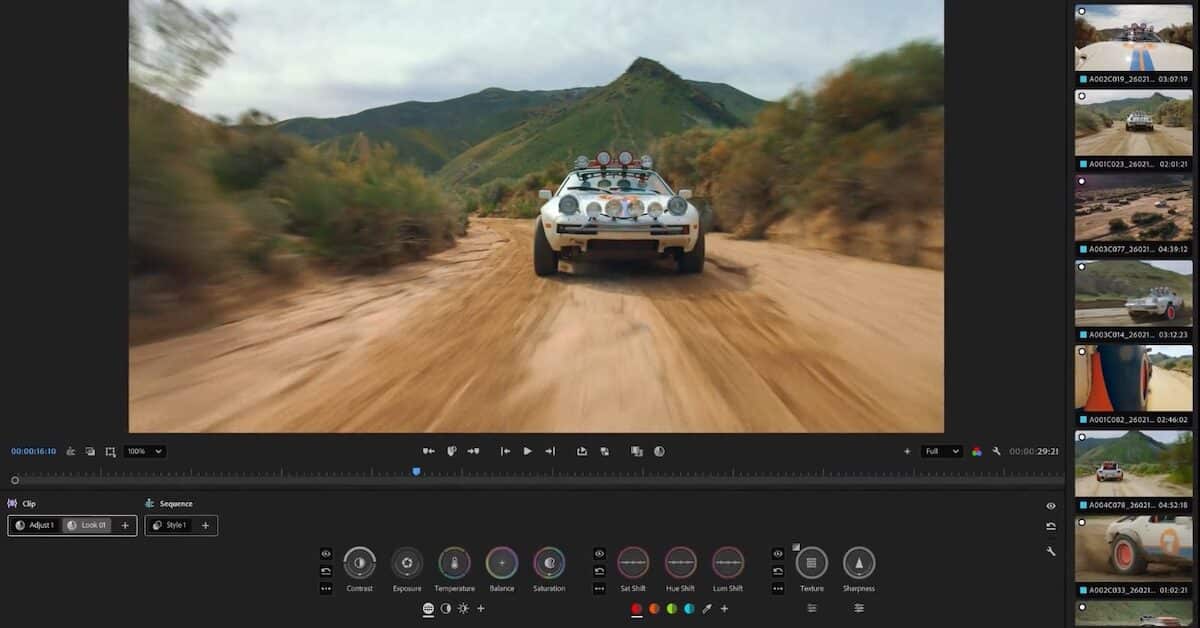
Adobe’s flagship editing software now features a brand-new panel that consolidates all professional color grading tools into a fresh and intuitive interface.
Scientists confirm: This is the most effective way to get your cat’s attention, according to new research
Elderly Couple Refuses Reserved Seats—Viral Train Standoff Sparks Fiery Debate on Courtesy
At NAB 2026, Adobe introduced several updates to its professional video tools, including a completely redesigned color grading experience in Premiere Pro called “Color Mode.” This new feature aims to provide professional and intuitive color management. Additionally, other updates were announced for Premiere Pro, as well as After Effects and Frame.io, alongside the launch of Firefly AI Assistant, a unified agent.
Color Mode: A Ground-Up Redesign of Color Grading in Premiere Pro
Premiere Pro now includes “Color Mode” (in public beta), a completely new color grading mode specifically designed for video editors. Unlike existing color tools, which are often derived from professional color grading applications, Color Mode was built from the ground up to integrate seamlessly into the editing workflow, Adobe explains.
Not just a feature, a panel, or an update. It’s a complete overhaul.
The project was led by Alexis Van Hurkman, a prominent figure in post-production (formerly of Blackmagic Design and author of several benchmark books on color grading). According to Adobe, the development took three years and involved hundreds of editors as part of the largest private beta ever conducted for Premiere Pro.
Why You Should Never Reheat These Foods in the Microwave – The Hidden Dangers Experts Warn About
I tried the top 5 guard dogs—here’s what makes these breeds the ultimate protectors
Color Mode is built on five pillars:
- UX: a new workspace with a large program monitor, a vertical clip grid, and extensive customization of the workspace unique to Premiere.
- Color Controls: bidirectional controls with animated HUDs that display adjustments in real-time.
- Styles and Modules: film emulations and color effects that can be applied individually or as presets, making complex styles accessible in just a few clicks.
- Operations: a new paradigm for applying, copying, and moving color choices at the clip, group, or sequence level. It’s possible to apply the same color grading across a series of sequences, with real-time visualization.
- AI Object Mask and Shape Masks: the ability to instantly isolate a subject with a simple hover and click, with bi-directional 3D tracking for targeted color grading and relighting.
The public beta of Color Mode is now available to all Premiere Pro subscribers, with general availability expected in 2026.
In addition, Premiere Pro 26.2 includes other enhancements such as new Film Impact effects and transitions, an Object Masking tool with Sharp and Smooth contour modes, a Sequence Index panel with integrated search for navigating complex timelines, and improved management of offline media relinking.
After Effects and Frame.io: AI Rotoscoping and Cloud Access to Projects
For After Effects, version 26.2 introduces Object Matte, a new AI-powered rotoscoping and masking tool. It allows for the creation of precise mattes on moving subjects with a simple hover and click, which can be refined using the Quick Selection brush and further perfected in complex areas (like hair and fine details) with the Refine Edge tool.
Adobe also announces Frame.io Drive, a new desktop application that enables editing Frame.io projects directly on a workstation. Media files appear in the Finder (macOS) or Explorer (Windows) and behave like local files in Premiere, Photoshop, or After Effects. On-demand streaming and local caching eliminate the need for downloads or synchronization, while the entire team works from a single source. Deployment begins immediately for Enterprise clients, with other plans to follow soon.
Availability of Color Mode and Frame.io Drive
- Color Mode in Premiere Pro: public beta available starting April 15, 2026, with general availability expected later in 2026.
- Frame.io Drive: immediate deployment for Enterprise clients, gradually opening to other Frame.io plans.
Similar Posts
- Adobe Unveils New Features in Premiere Pro and After Effects: Discover What’s New!
- Premiere Pro Update: Adobe Unleashes Over 90 New Effects, Transitions, and Animations!
- Adobe Unveils Premiere for Android: One Year After iPhone Release
- Adobe MAX 2025 Unveiled: Firefly, AI Assistants, and Audio Innovations – Key Takeaways!
- Adobe Unveils Premiere App for iPhone: Everything You Need to Know

Jordan Park writes in-depth reviews and editorial opinion pieces for Touch Reviews. With a background in UI/UX design, Jordan offers a unique perspective on device usability and user experience across smartphones, tablets, and mobile software.