
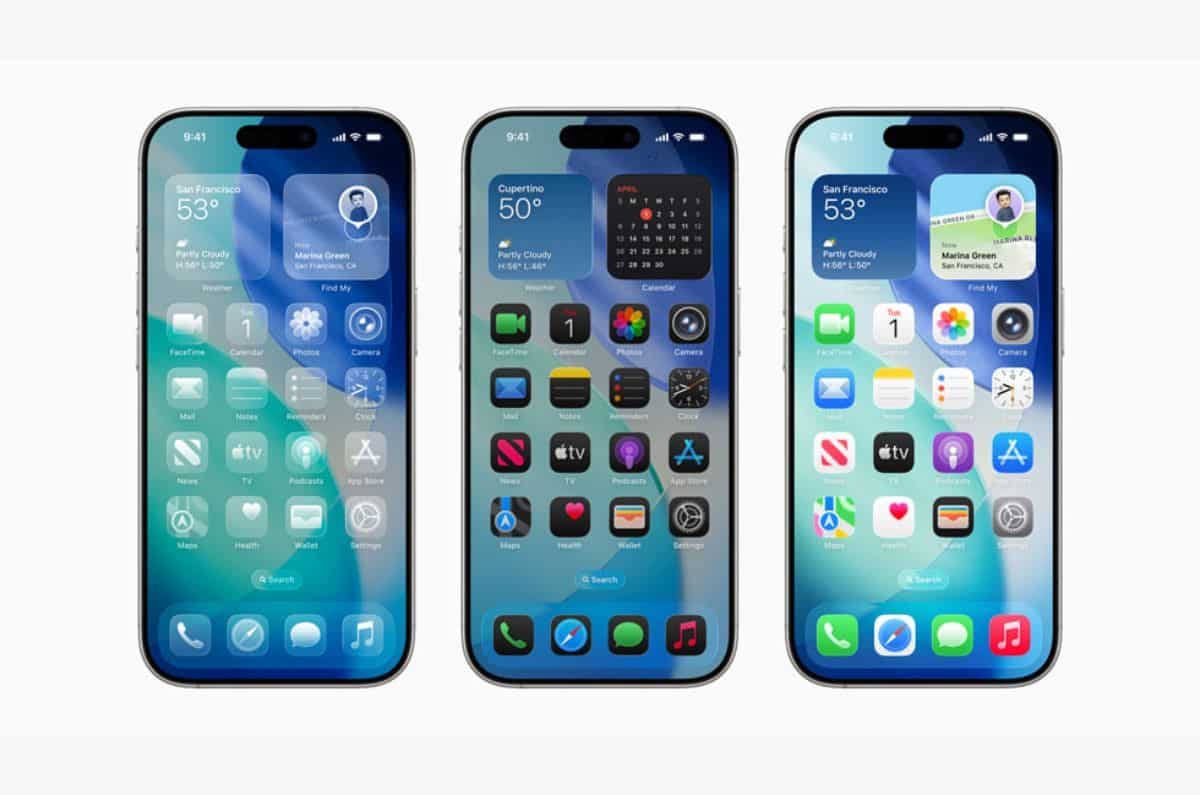
Revolutionary Icon Customization
iOS 26 introduces the new Liquid Glass design with translucent icons. To activate this feature, press and hold any empty space on your home screen, tap “Edit,” then “Customize,” and select “Translucent” from the available options.
Scientists confirm: This is the most effective way to get your cat’s attention, according to new research
Elderly Couple Refuses Reserved Seats—Viral Train Standoff Sparks Fiery Debate on Courtesy
Users can choose between light and dark backgrounds, with icons available in small or large sizes. The new tinted mode allows for custom color selection based on your wallpaper or phone case.
Enhanced Lock Screen Personalization
The lock screen receives a major upgrade with new customization options. Access these features by going to Settings > Wallpaper or long-pressing the lock screen and selecting “Edit.”
The new interface allows for dynamic clock sizing, with text that can interact with wallpaper elements for a sophisticated depth effect.
AI-Powered Spatial Scenes
A standout feature is the new spatial scenes capability. By tapping the hexagon icon, users can create AI-generated 3D effects that respond to phone movement, creating an immersive visual experience.
The depth effect can be fine-tuned using pinch gestures, with options to adjust wallpaper positioning and transparency levels.
Widget Integration and Clock Customization
The clock face offers extensive customization options, including:
- Multiple font styles and weights
- Glass or solid effects
- Custom color selection
- Repositioned widgets for better depth integration
Advanced Display Options
Users can now create cohesive designs across both lock screen and home screen. The new system offers:
- Seamless transitions between screens
- Intelligent widget placement
- Dynamic visual effects with music playback
- Enhanced depth perception with multilayered designs
Conclusion
iOS 26’s customization features represent a significant leap forward in iPhone personalization. These tools allow users to create unique, dynamic interfaces that blend aesthetics with functionality, making each iPhone truly personal while maintaining Apple’s signature polish.
Why You Should Never Reheat These Foods in the Microwave – The Hidden Dangers Experts Warn About
I tried the top 5 guard dogs—here’s what makes these breeds the ultimate protectors
Similar Posts
- iOS 26 Unveiled: Discover 10 Free Liquid Glass Wallpapers!
- Pixel Phones Get Long-Awaited Customization Feature: Android 16 Unveils New Options!
- iOS 26 Transforms iPhone Aesthetics: Discover the New Colorful Wallpapers!
- iPhone, Mac, and iPad Users Win: Liquid Glass Now Tolerable With New Feature!
- Apple Releases All New Betas: iOS, iPadOS, macOS, tvOS, and watchOS 26.2 Now Available!

Ben Thompson is a tech strategist and contributing journalist. He breaks down complex industry movements into practical insights for everyday users. Known for his sharp analysis of big tech trends and business models, Ben draws from years of experience as a consultant and founder of Stratechery. At Touch Reviews, he focuses on how major innovations—from AI tools to platform shifts—translate into real-life impacts and actionable tips for users who want to stay ahead of the curve.
Ben.Thomson@touchreviews.net