
Scientists confirm: This is the most effective way to get your cat’s attention, according to new research
Elderly Couple Refuses Reserved Seats—Viral Train Standoff Sparks Fiery Debate on Courtesy
The Kindle Scribe Colorsoft combines features from two other Amazon e-reader lines, namely the Kindle Scribe and the Kindle Colorsoft. It features a stylus and digital notebooks, along with a color e-ink display. This e-reader is also the largest (11 inches) and most expensive Kindle ever created by the brand. Initially released in North America in the fall of 2025, it has been available since mid-June in France. What can we expect from such a product? Does Amazon’s premium color e-reader meet the challenge in a competitive market? Here is our review of the Kindle Scribe Colorsoft.
Amazon Kindle Scribe Colorsoft (2025)
at the best price
-
Amazon
649,99 € -
Cdiscount
649,99 €
Why You Should Never Reheat These Foods in the Microwave – The Hidden Dangers Experts Warn About
I tried the top 5 guard dogs—here’s what makes these breeds the ultimate protectors
Technical Specifications
| Model | Amazon Kindle Scribe Colorsoft (2025) |
|---|---|
| Dimensions | 189 mm x 5.4 mm |
| DPI | 300 dpi |
| Internal memory | 64 GB |
| Battery life (according to manufacturer) | 112 days |
| Type of connector | USB Type-C |
| Weight | 400 g |
| Color | Gray, Mauve |
| Appearance | Metal |
| Protection index | IPx8 |
| Product sheet |
The unit for this review was provided by the brand.
Design
The chassis of the Kindle Scribe is practically impeccable. With its 11-inch screen, the e-reader has moderate dimensions of 18.9 x 24.5 cm and only 5.4 mm thick. The weight is particularly appreciated in hand: at 400 grams, it is easy to forget you’re holding it.
The aluminum chassis has fine finishes. Four small rubber pads allow it to stay in place on a table. Our graphite color is a dark gray slightly tinted with blue, perfectly understated. There is another color called Fig, a sort of burgundy (only available in the 64 GB version), which must be very pretty. The only small design misunderstanding for me: the stylus is… white. Why not have a graphite-colored stylus? The white stands out a bit once attached to the side of the e-reader. Especially since the Fig color does come with a matching stylus…
Unlike its predecessor, the new Scribe features a symmetrical design with four same-sized edges around the screen. There is no “handle” on the left (or bottom) to grab it. This may bother some, but the left edge is still wide enough to rest your thumb.
On the lower edge, you will find the USB-C port for charging. The right edge houses the unlock button and the magnetic slot for the stylus, where it automatically recharges.
However, it is regrettable that it lacks water resistance. For a Kindle, and at this price… it’s surprising.
Screen
The Scribe Colorsoft features an 11-inch Amazon Colorsoft screen. Its resolution in black and white is 300 dpi and 150 dpi in colors.
It must be said that it didn’t particularly impress us. The color saturation is notably poorer than on the reMarkable paper Pro and Paper Move, which use a Kaleido 3 screen. The colors are particularly dull if you turn off the backlight. Fortunately, the backlight is of very high quality and its temperature can be adjusted, which is pleasant if you use the e-reader in the evening.
As always with color e-ink screens, the black/white contrast is much poorer than on a black and white screen e-reader. As a result, the screen is darker and the letters less readable. Therefore, it is almost mandatory to keep some background lighting on, even during the day – which inevitably impacts battery life. You might even want to turn it up to full to get more visible colors. Compared to a classic Kindle, the difference is striking without backlighting.
But let’s be honest and compare what is comparable, for example, the screen of the Kindle Scribe Colorsoft and that of the ReMarkable Paper Pro, two products with color screens and roughly the same price. Here are the comparisons on the same file, without backlighting.
What is immediately noticeable is that the white background of the Kindle is quite dark compared to its competitor. Everything is darker, the same goes for the colors, which lack vibrancy. This is why the backlight becomes indispensable.
Another comparison here on a color PDF file. It is observed that the Kindle, on the right, did not manage the background, which does not display as white. On the cover, the Kindle’s rendering is always much darker.
While color saturation and contrasts didn’t particularly impress me, the definition is really good, even when zooming in on text or comic book panels. And since the integrated chip is fast, everything is very fluid.
Note that the color rendering depends a lot on the file: a PDF may struggle, while a comic taken from the Amazon store will be prettier.
Writing Sensation and Stylus
Amazon talks about a “textured surface”. Yet, it is much less so, for example, than that of the screens of the ReMarkables. The sensation is more “slippery” because the coating is very smooth. A bit further from the “paper” feeling, it remains nevertheless very pleasant because, precisely, the stylus tip glides perfectly on it. Some will appreciate it, others less so, it’s entirely a matter of taste.
The stylus is responsive to pressure for the width of the line, without being extremely sensitive either. The tips need to be replaced from time to time and are included in the box.
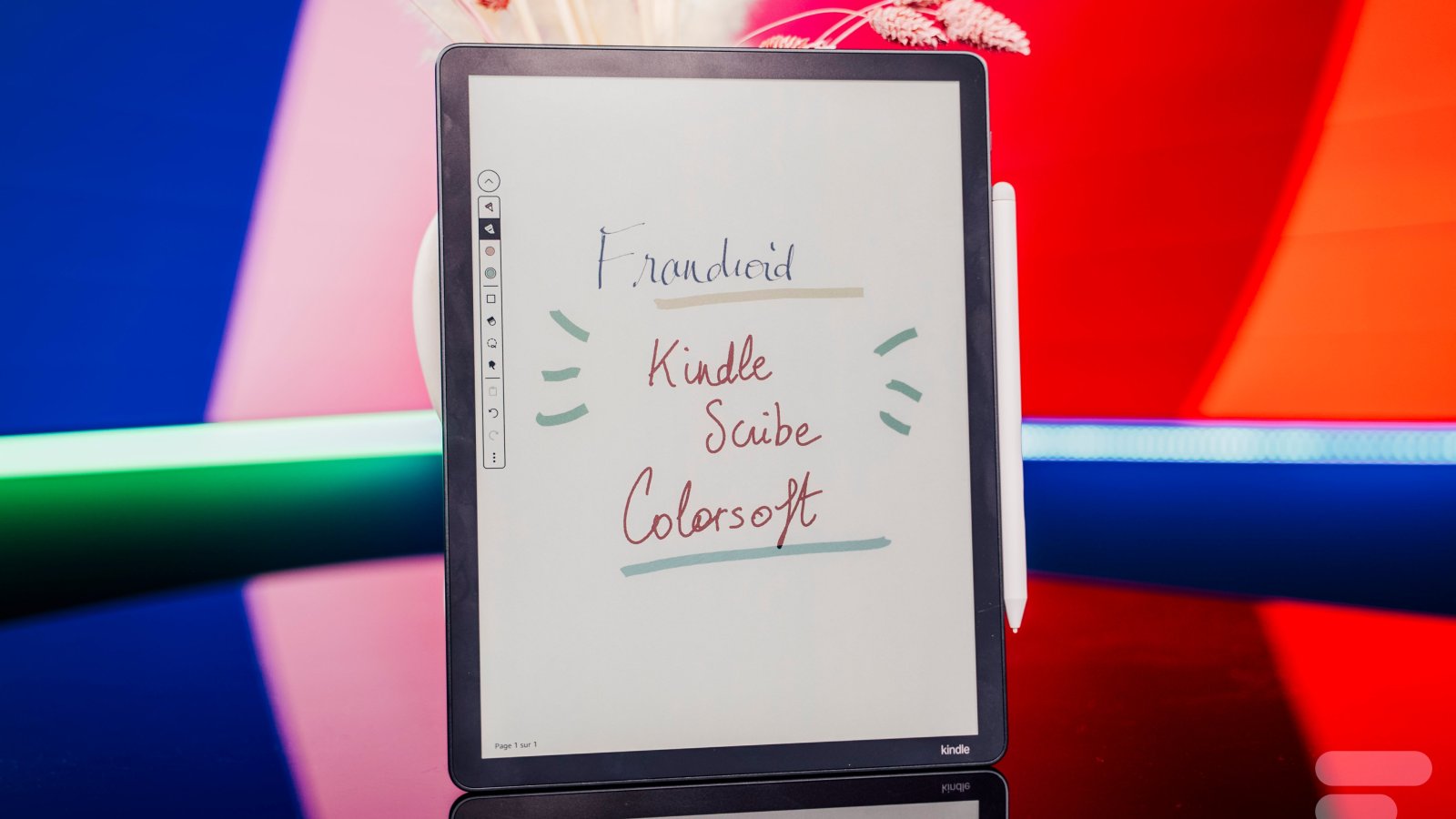
You have access, in addition to black and gray, to 8 colors of choice when using the stylus, whether it is for writing in a notebook or annotating a book. The photo below is true to reality to give you an idea of the color renditions. The display of color during writing is, however, instantaneous, a good point, because this is not necessarily the case with all color e-ink screens, which sometimes need to “blink” once to switch from gray to color.
The stylus itself is very responsive with very low latency. It is also very light in hand with a good format.
Special mention to the eraser at its end which reproduces the somewhat soft sensation of real erasing very well.
Performance and Usage
The Scribe Colorsoft has a Quad-core processor and 4 GB of RAM. It is available with 32 or 64 GB of storage space. On our 32 GB test model, there is about 21 GB of real user space left. It includes Wi-Fi 5 (dual-band) and Bluetooth 5.1, which allows listening to audiobooks.
In use, loading times are smooth, the Kindle Scribe is fast.
Ebook Reading and Annotation
This is, of course, one of the strengths of the Kindle: ebook reading, the primary mission of the device.
The reading experience is excellent – as on any Kindle. In an e-book, the display is precisely adjustable by tapping at the top of the screen, from the size of the margins to the font and its size. Thanks to its processor, the most powerful in the range, navigation is smooth, whether in the menus or especially between the different pages of a file.
If you want to annotate the text, you can highlight a word. By default, you just need to hold the button on the body of the stylus to activate the highlighter. Then, don’t worry about making a straight line: the color will automatically be transformed into a clean trace. The same goes if you underline a word awkwardly. If you annotate, a margin will automatically open on the right side to gather your notes.
It is also possible to attach a note to a specific place, near a word, for example, which opens a small contextual bubble. You can then write by hand or with the keyboard.
You can also add bookmarks and use the dictionary.
Notebooks
The other great function of the Kindle Scribe in addition to the e-reader. Like any digital notepad, you can create notebooks, choosing the canvas of your choice, from a blank page to various lined options, including checklists or even musical scores.
Once your page is open, you have a small menu for the stylus. For the line, you have the choice between pen, fountain pen, marker, pencil, and shader, with 5 thicknesses available and 8 colors. You can also draw shapes like arrows, circles, triangles.
There are a few AI-related features on a note page. You can ask for a summary of the page, as well as the “refine writing” function, which transforms handwritten writing into typewritten text. Unfortunately, the font used is made to resemble handwritten writing. You can then send this page by email, in PDF or .txt format.
Another way to share documents: Google Drive and Microsoft OneDrive. Once your accounts are linked, you can import and export documents, including your notebooks. However, synchronization is not automatic, you have to do everything manually.
The system remains somewhat closed, the sharing and synchronization functions of the notebooks are succinct. We are clearly not here on a professional work tool, but it will suffice for a few meeting or class notes.
Software
Unsurprisingly, the Scribe Colorsoft runs on Kindle OS. While it is relatively simple to use, this OS may require a small period of adjustment to acquire certain reflexes if it is your first time using it.
One of the great advantages of Kindle e-readers lies in the Amazon ecosystem, whose digital library is undoubtedly the richest and most varied on the market. Amazon Prime members also benefit from Prime Reading, an included service that provides free access to a changing selection of thousands of e-books. As for the most avid readers, they can turn to the Kindle subscription, which costs 9.99 € per month and offers additional access to more books.
In short, the choice of reading material is immense on Kindle, especially since the platform also incorporates newspapers, manga, and audiobooks. Thanks to Bluetooth, it is possible to connect wireless headphones to listen to your Audible titles directly from the device.
If you don’t want to stick only to the Amazon store, it is also possible to read ePub or PDF files. Just use the “Sent to Kindle” service, which works with the mobile app.
Navigation and Organization
The initial setup of a Kindle is extremely simple and intuitive – provided you already have an Amazon account. Once everything is set up, the display is organized between three tabs: Home, Library, and Workspace. “Library” displays all your e-books, “Workspace” all your notebooks, and the home gathers everything, with a “Quick Access” tab that suggests recently used notes and e-books.
The settings and possible changes are limited and quite classic. Note that in the “More” tab, you have access to a web browser, which will work for loading pages that are not too heavy.
Apart from that, the Kindle has a drop-down menu with quick shortcuts to Bluetooth, dark mode, airplane mode, and the backlight and its temperature. Simple and effective.
Battery Life
The brand promises up to 8 weeks of reading and 2 weeks of writing. In practice, without using it every day, but making use of the stylus and color, the Kindle lasted about two weeks. I always used it with the backlight activated at about 50% – this latter being almost indispensable, even during the day. Moreover, I always had the Wi-Fi activated. No doubt that using it in Airplane mode would extend the battery life, even if 8 weeks seems a bit optimistic to me.
Regarding charging, starting from 10% remaining, the e-reader took 2h10 to fully charge with a 40-watt charger. A very typical score for an e-ink tablet.
Note that the USB-C cable is included in the box, but not the power block.
Price and Availability
The Kindle Scribe Colorsoft is priced at 649.99 euros for the 32 GB version and 699.99 euros for the 64 GB version, including the stylus. Its high price is far from negligible.
Amazon Kindle Scribe Colorsoft (2025)
at the best price
-
Amazon
649,99 € -
CdiscountSimilar Posts
- Unbelievable Deal: Kindle Scribe Gen 2 Hits Record Low Price for Prime Day – Lowest Ever!
- New Kindle Scribe Review: Is It the Ultimate E-reader for 2025?
- Unbelievable Kindle Deals Starting at Just €92: Get the Best Prices on Color and Stylus Options!
- Score Big Savings: Get Up to 40% Off on Kindles Before Amazon’s Spring Sale – Top 7 E-Reader Deals Revealed!
- Kindle Scribe Colorsoft Unveiled: Experience the Ultimate in Color Reading and Writing!

Maya Singh is a senior editor covering tablets and hybrid devices. Her work explores how these tools reshape digital productivity and learning. She also contributes to feature editorials on emerging tech.