
The Ideal Addition to Any Apple Setup
Scientists confirm: This is the most effective way to get your cat’s attention, according to new research
Elderly Couple Refuses Reserved Seats—Viral Train Standoff Sparks Fiery Debate on Courtesy
It’s undeniable that the latest iPads are essentially portable computers in tablet guise. Equipped with the same M-series processors found in MacBooks and enhanced by the new windowing capabilities of iPadOS 26, Apple’s most recent tablets have evolved into formidable tools for productivity.
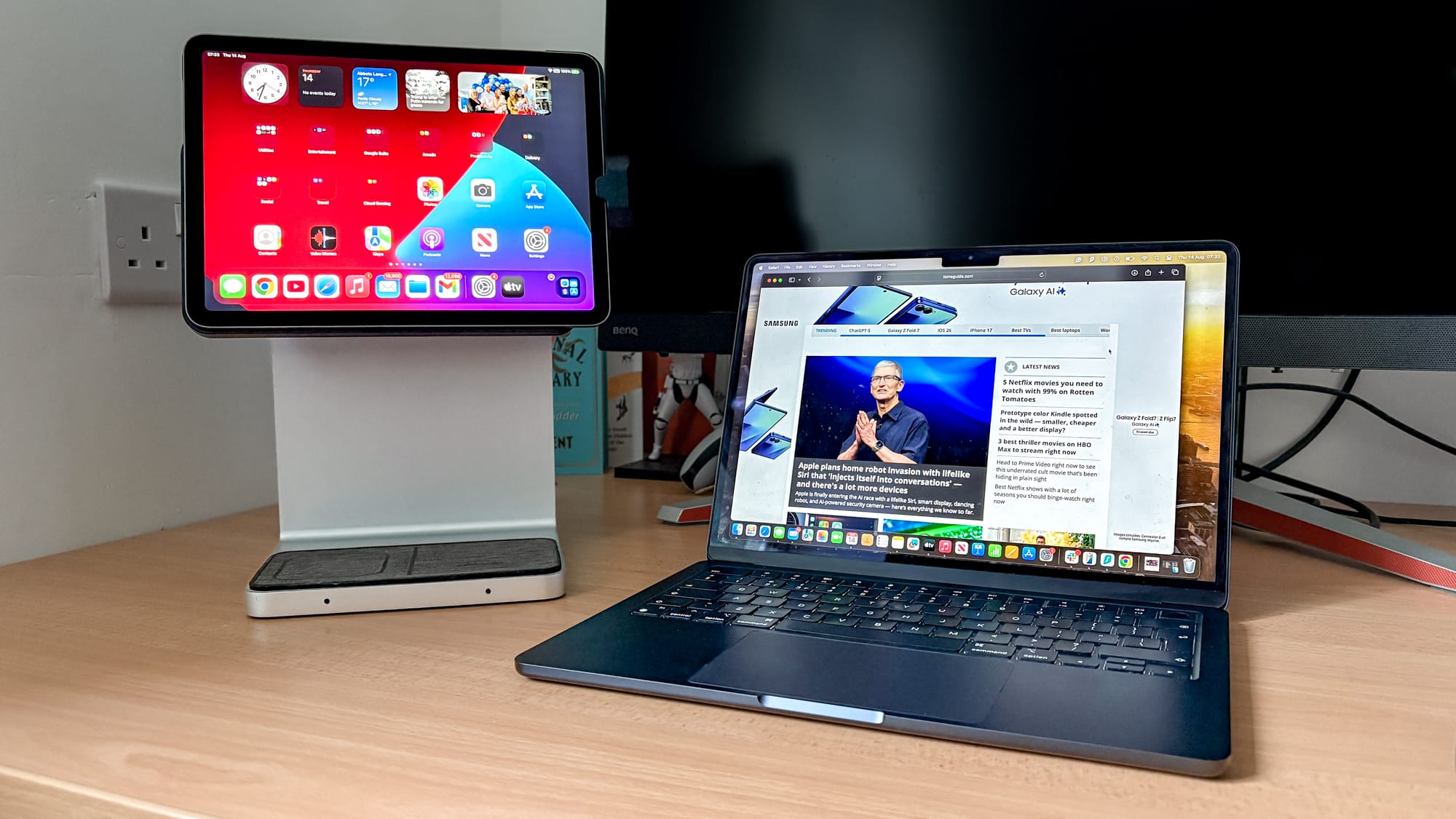
For over four years, I’ve been exploring the capabilities of the iPad, beginning with my acquisition of the Kensington StudioDock. Having evaluated a multitude of docking stations, the one consistently gracing my desk is specifically designed for Apple’s tablets, and for several compelling reasons.
This docking station not only anchors an iPad Air or iPad Pro within a desk arrangement but also seamlessly integrates with the Apple ecosystem.
This docking station not only anchors an iPad Air or iPad Pro within a desk arrangement but also seamlessly integrates with the Apple ecosystem. It includes two Qi wireless charging pads at its base to power up an iPhone and AirPods, and an optional side accessory to charge an Apple Watch, serving as a convenient central station for nearly all my Apple devices.
The dock also boasts multiple USB-A ports for attaching peripherals like keyboards and mice, an HDMI output supporting 4K at 60Hz, an SD card reader, an Ethernet port, and even a 3.5mm audio jack. While Apple’s Magic Keyboard attempts to give the iPad a laptop-like functionality, this StudioDock nearly transforms it into a compact desktop computer.
However, it is exorbitantly priced. Initially launched at $379, it remains challenging to find it for much less today. It’s also scarce in availability, but I managed to locate one on Newegg priced at least $279, which is still a significant investment.
Delving deeper, there are listings for a StudioDock on eBay priced at $89. For a dock that includes versatile ports and a solid stand, this is more reasonable. For those in the U.K., it’s currently available on Amazon for £118.
This dock, though aging, continues to be an invaluable asset due to Apple’s ongoing support for device interconnectivity, akin to how an iPhone syncs with a MacBook. The StudioDock has proved to be an extremely useful extension for my MacBook Air M3.
The StudioDock not only provides numerous benefits that transform my iPad Air into something resembling a desktop but also serves as a key accessory that broadens my productivity capabilities. And it all comes down to one vital feature.
Enhanced Functionality
With the advent of iPadOS 26, it’s increasingly clear that an iPad can substitute for a MacBook, but its real strength comes when used in conjunction with Universal Control. This feature has been a game-changer, and I’ve maximized its potential with the StudioDock to enhance my screen setup.
Simply by moving the MacBook’s cursor to the iPad, I am able to manage both devices simultaneously. It becomes an additional display where I can browse websites, watch videos or livestreams, review photos, or play music. Coupled with an extended display, this creates a dynamic work environment where the iPad plays a crucial role.
The StudioDock further enhances this setup with its 120-degree adjustable hinge, allowing me to tailor the viewing angle to my preference and switch between landscape and portrait modes effortlessly. The stand’s height is ideal, although, regrettably, it is not adjustable.
This iPad dock, when paired with a MacBook, offers a unique setup that few other docks can match. Its primary role may be to provide ports, but when combined with a tablet stand that includes a significant amount of I/O options, it creates a productivity-enhancing setup. And Apple’s Continuity features, such as Universal Control and Sidecar, which allow the use of an iPad as a second display for a Mac, are just icing on the cake.
I could indeed use the StudioDock to give my iPad Air a desktop overhaul, equipped with a Lemokey P1 HE keyboard and NZXT Lift Elite Wireless mouse. With its HDMI connectivity, it can even extend to a second display, broadening the iPad’s capabilities.
However, when I have a MacBook that is more suited to my daily productivity needs, I find myself choosing it over the iPad nearly every time.
Aesthetic Appeal
Creating a desk setup that is both functional and visually appealing is essential. Thus, when a product does not align with the overall style of the items on your desk, it becomes less desirable.
One of the advantages of the StudioDock is that it effortlessly fits into an Apple-centric setup. Its silver aluminum frame, magnetic holder that positions the iPad prominently (while charging it via a USB-C connector), and gray-threaded material that outlines the placement for wireless charging of an iPhone and AirPods case (at 7.5W and 5W, respectively), all contribute to that quintessential clean “Apple aesthetic.”
While other iPad stands and docks from brands like Plugable or Anker are more minimalistic, the substantial six-pound StudioDock stands out with its robust weight and non-slip feet, adding to its premium look and feel.
Is the StudioDock Still Relevant for iPads?
I’ve been using my Kensington StudioDock for years, and it’s unlikely to leave my desk anytime soon. It’s unfortunate that it’s become difficult to find, as it offers a unique docking experience for iPad owners that many would appreciate. However, it’s even more unfortunate how expensive it remains (I’ve seen prices as high as $463).
If you can acquire one for under $100, and own multiple Apple products, the StudioDock will be a standout feature on your desk. However, be aware that it appears to only be compatible with iPad Air and iPad Pro models up to 2022, according to product listings. If you own the latest M4 iPad Pro, this dock will not be compatible.
This limitation implies a restricted lifespan for this dock, and given its age, that’s not too surprising. But for what it’s worth, if a new dock emerges that matches the StudioDock’s capabilities, your setup will definitely benefit from it.
Follow Tom’s Guide on Google News to stay updated with our latest news, how-tos, and reviews. Be sure to hit the Follow button
- I review laptops for a living — and I just tested the ultimate MacBook docking station for my home office
- I ditched the iPad mini for an Android alternative — and this one feature means I might not go back
- I replaced my MacBook with an iPad Pro for a month — here’s what happened
Similar Posts
- Essential iPad Hacks: 15 Shortcuts Every iPad Reviewer Swears By
- Exciting Update Alert: New iPad 12 & iPad Air 8 To Launch With Significant Upgrade
- Top Tablets Under $500: Discover Our Expert Reviews and Top Choices!
- Google Pixel Tablet Slashes Prices: Grab Yours Now for $150 Off!
- Act Fast: Massive Apple Discounts on Amazon Start at $24 – Top 15 Early Labor Day Finds You Can’t Miss!

Tobias Nguyen covers mobile technology and social media trends. He combines a background in digital marketing with a passion for emerging tech to provide readers with data-driven insights and practical tech usage tips.