
Scientists confirm: This is the most effective way to get your cat’s attention, according to new research
Elderly Couple Refuses Reserved Seats—Viral Train Standoff Sparks Fiery Debate on Courtesy
Amazon has expanded its range of connected devices with the Fire TV Stick 4K Select, an affordable solution for turning any 4K TV into a full-fledged streaming platform. Priced at 54.99 euros, it primarily targets households looking for a compact and efficient device to enhance their streaming experience and convert any TV into a “Smart TV”. It ranks below the Fire TV Cube, Stick 4K Max, Stick 4K Plus, but above the Stick 4K HD.
| Maximum Definition | HDR/Dolby Vision | Audio | Wi-Fi | Alexa Remote | Memory/Storage | |
| Fire TV Cube | Ultra HD 4K | HDR10+, Dolby Vision | Dolby Atmos | Wi-Fi 6E | Yes | 2 GB / 16 GB |
| Fire TV Stick 4K Max | Ultra HD 4K | HDR10+, Dolby Vision | Dolby Atmos | Wi-Fi 6/6E | Yes | 2 GB / 16 GB |
| Fire TV Stick 4K Plus | Ultra HD 4K | HDR10+, Dolby Vision | Dolby Atmos | Wi-Fi 5 | Yes | 1.5 GB / 8 GB |
| Fire TV Stick 4K Select | Ultra HD 4K | HDR10+ | Dolby Atmos | Wi-Fi 5 | Yes | 1 GB / 8 GB |
| Fire TV Stick HD | Full HD | No | Dolby Audio | Wi-Fi 5 | Yes | 1 GB / 8 GB |
Unlike its predecessors based on Fire OS (Android), the 4K Select introduces Vega OS, a new environment designed to be more responsive, promising smoother navigation and personalized recommendations.
The competition in the HDMI stick market is fierce. Devices such as the Roku Streaming Stick 4K, Google Chromecast, and Xiaomi TV Stick with Google TV also compete in the 4K streaming segment at moderate prices. Each offers unique interfaces and app compatibilities, often differentiated by support for Dolby Vision, Dolby Atmos, or newer Wi-Fi versions. While Amazon opts for HDR10+ and the AV1 codec, competitors stand out with other features like higher data rates (Wi-Fi 6/6E in the latest Chromecast or Fire TV Stick 4K Max generations), and full support for advanced audio.
The aim of the 4K Select is to simplify 4K streaming for the masses, without over-complication or extra costs, while remaining compatible with most market services. This stick targets users who value simplicity and are not necessarily looking for the most advanced standards, but want a comfortable daily use with Netflix, Prime Video, Disney+, YouTube, and a few essential apps.
Amazon Fire TV Stick 4K Select (2025)Technical Specifications
| Model | Amazon Fire TV Stick 4K Select (2025) |
|---|---|
| Definition | 3840 x 2160 pixels |
| Compatible HDR | HDR10+ |
| Operating System (OS) | Vega OS |
| Voice Assistant | Amazon Alexa |
| App Store | Yes |
| Product Sheet |
Amazon Fire TV Stick 4K Select (2025)Simple and Effective Design
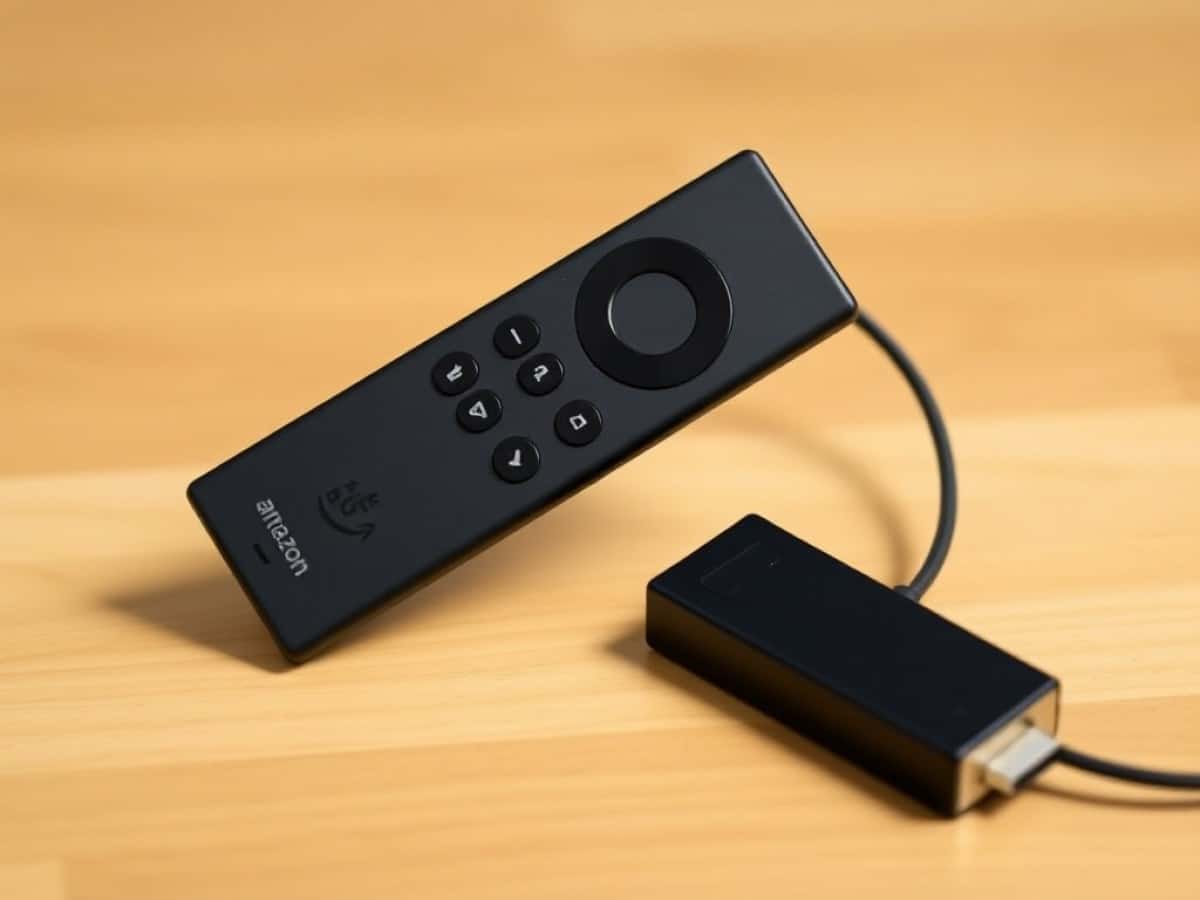
Unsurprisingly, the Fire TV Stick 4K Select follows the visual approach of the Amazon range: a discreet, black, compact, and universal stick. Its minimalist rectangular shape allows it to easily blend into any setting, whether plugged directly into the TV’s HDMI port or using the small extension included in the box, which is handy for hard-to-reach ports.
The build quality is decent, and the use of recycled materials is highlighted by Amazon, reflecting its strengthened environmental policies in recent years.
Its compactness ensures it remains unnoticed behind most screens, even in wall-mounted setups.
Besides the male HDMI connector that plugs into the TV, the device requires electrical power.
This is done via a micro-USB connector. Yes, you read that correctly. At a time when the European Commission mandates USB-C chargers for smartphones, tablets, and other electrical devices, this choice is quite surprising. Amazon might argue that the Stick is always plugged in and does not face the same constraints as mobile devices.
Thermally, the stick efficiently manages the heat generated during 4K content playback, with no overheating or slowdown observed during extended viewing sessions.
The packaging is plain and functional: all necessary accessories are included (USB cable, power adapter, HDMI extension, remote control).
Enhance your protection against scams with Free Avast Antivirus. Block the latest malware, detect online scams, and get tips with our new Avast Assistant.
Amazon Fire TV Stick 4K Select (2025)Connectivity
Like other devices of its kind, the Fire TV Stick 4K Select features essential connectivity options. It includes an integrated HDMI 2.0 port for transmitting image and sound up to Ultra HD HDR, as well as a micro-USB port for external power. Nothing extravagant: no Ethernet port, no dedicated audio output, or micro SD card reader.
Furthermore, Wi-Fi 5 is the only available network connection, sufficient for most 4K domestic uses (streaming Netflix, Prime Video, Disney+).
The absence of Wi-Fi 6/6E might be a limitation for setups where the network is heavily used, such as in connected apartments or houses. However, for regular use, no significant quality loss is noticeable: the stick can deliver all compatible 4K streams without interruption, provided there is a decently placed box, repeater, or router near the TV.
Audio streams are transmitted through the HDMI connection, with pass-through support: the stick does not locally decode Dolby Atmos/Dolby TrueHD formats but leaves this task to the compatible home cinema amplifier or soundbar. This compromise may bother audiophiles but remains transparent for most users: compatibility remains broad for Dolby Digital and Dolby Digital Plus with most equipment. Lastly, note that storage remains limited to 8 GB, which does not allow for massive installation of heavy apps or games but is sufficient for streaming and typical uses.
Amazon Fire TV Stick 4K Select (2025)The Remote Control
Unlike older Chromecast devices, the Stick 4K Select comes with a remote control. It retains the same format as previous generations: discreet, compact, and very intuitive. Its handling is immediate: essential buttons are present for navigation, volume control, power (infrared compatible with TV, soundbar, or amplifier), as well as four direct shortcuts to access major apps (Prime Video, Netflix, Disney+, and Apps).
The remote allows control of the TV and compatible audio devices, avoiding the need for multiple remotes on the table and simplifying the entire home cinema ecosystem. The responsiveness of the remote is very satisfactory, without annoying latency, and pairing with the stick takes only a few seconds during the initial setup.
In terms of ergonomics, button feedback is distinct, and voice navigation management (search, launch, control content) remains Amazon’s strong point, accessible with a click. One regret, as always: the absence of backlit keys, which could have facilitated its use in the dim ambiance of a home cinema.
Amazon Fire TV Stick 4K Select (2025)Image and Sound
The Fire TV Stick 4K Select uses an in-house processor and supports HDR10+ format, which dynamically adjusts the light curve scene by scene, although the management isn’t as precise as Dolby Vision on some titles. In the absence of Dolby Vision, HDR10+ content (Prime Video, Netflix, Disney+) benefits from a noticeable enhancement in dynamics and contrast, especially on compatible TVs.
Color rendering is vibrant, gradients are well-managed, and the stick maintains a smooth flow up to 60 frames per second, which is appreciable for action movies or sports streaming. The technology used allows full enjoyment of UHD masters, although the level of brightness and overall contrast also depends on the TV panel used. Transitions from dark to light scenes occur smoothly.
Tested movies on Prime Video, Netflix, and Disney+ show that the stick perfectly fulfills its mission: no artifacts, effective management of image modes, and no stuttering even during intense streaming.
On YouTube or Twitch videos, the 4K/HDR rendering remains solid, without noticeable degradation, all within a fast and responsive interface. For most users, the Fire TV Stick 4K Select will remain among the top affordable solutions, especially for those seeking uncomplicated 4K streaming.
In terms of sound, the Fire TV Stick 4K Select provides adequate support for Dolby Digital and Dolby Digital Plus formats, transmitted via pass-through over HDMI to compatible equipment. It does not locally decode Dolby Atmos or Dolby TrueHD, leaving this task to the amplifier or soundbar, which may limit the experience on some titles if the audio ecosystem is not perfectly adapted.
Amazon Fire TV Stick 4K Select (2025)Interface
The interface of the Stick 4K Select is based on Vega OS. It’s a new system developed by Amazon’s teams that is built on Linux components, similar to Android, while Fire OS uses a modified version of Android. Are you still following? Amazon’s idea is to be less dependent on Google than before and to offer faster app startups, better memory management, and smoother navigation.
Practically, this also means that apps previously developed for Android (and thus working under Fire OS) need to be redeveloped. For this, Amazon provides dedicated tools for app developers to facilitate porting. Don’t worry if you’re not interested in these “technical details,” the Stick 4K Select comes with all the most common streaming apps: Prime Video (of course), Netflix, Apple TV, Canal+, Disney+, Molotov, etc.
Other apps, if not yet available, will arrive in the coming weeks or months. Installation now goes through Amazon’s Appstore.
On-screen, it’s hard to tell the difference between the Fire OS and Vega OS interfaces. There’s a main panel that pushes programs supported by the platform, a strip of some features: Profiles, My Space, Search, Home, and Live, and then the thumbnails of the 6 main streaming apps. This interface can be customized and even adapts to the content you watch to place the most viewed apps first. Below, there’s an aggregation of movies and series from several platforms where you can “pick and choose.”
Day-to-day, navigation is remarkably smooth. The initial setup takes a few minutes, user accounts are quickly synced (Prime Video, Netflix, Disney+, YouTube), and app management is straightforward from the dedicated Appstore, which thus gathers the essentials of streaming and entertainment. The interface is more lively and responsive than previous generations under Fire OS/Android. There’s no need to create a new Amazon account or anything else; the system retrieves your main profile as well as secondary profiles. Each user can thus find their favorite apps, their playlists, and their own flow of recommendations.
The personalized recommendations evolve based on viewing habits. It’s also possible to refine or obscure the suggestions, to keep control over the experience.
Finally, voice navigation through Alexa remains a strong selling point, with simple requests (awaiting Alexa+): searching, launching, and controlling a video by voice happens naturally and integrates seamlessly into the connected home ecosystem.
For gaming, the device provides access to Xbox Cloud Gaming and Amazon Luna (coming soon). Just pair a controller via Bluetooth, and you can directly play less resource-demanding games (mainly due to the limitations of wireless network performance) on your TV without needing a console or PC. Some games are playable with the remote control, requiring no other accessories.
Last but not least, a note on the energy consumption of the Fire TV Stick 4K Select, which remains very controlled, not exceeding a few watts, which is typical for this type of solution, well below operator boxes or gaming consoles.
Amazon Fire TV Stick 4K Select (2025)Price and Release Date
Priced at 54.99 euros, the Fire TV Stick 4K Select currently represents the most affordable option from Amazon for 4K HDR10+ streaming. It has been available in France since mid-October 2025.
Amazon Fire TV Stick 4K Select (2025)
at the best price

Maya Singh is a senior editor covering tablets and hybrid devices. Her work explores how these tools reshape digital productivity and learning. She also contributes to feature editorials on emerging tech.