
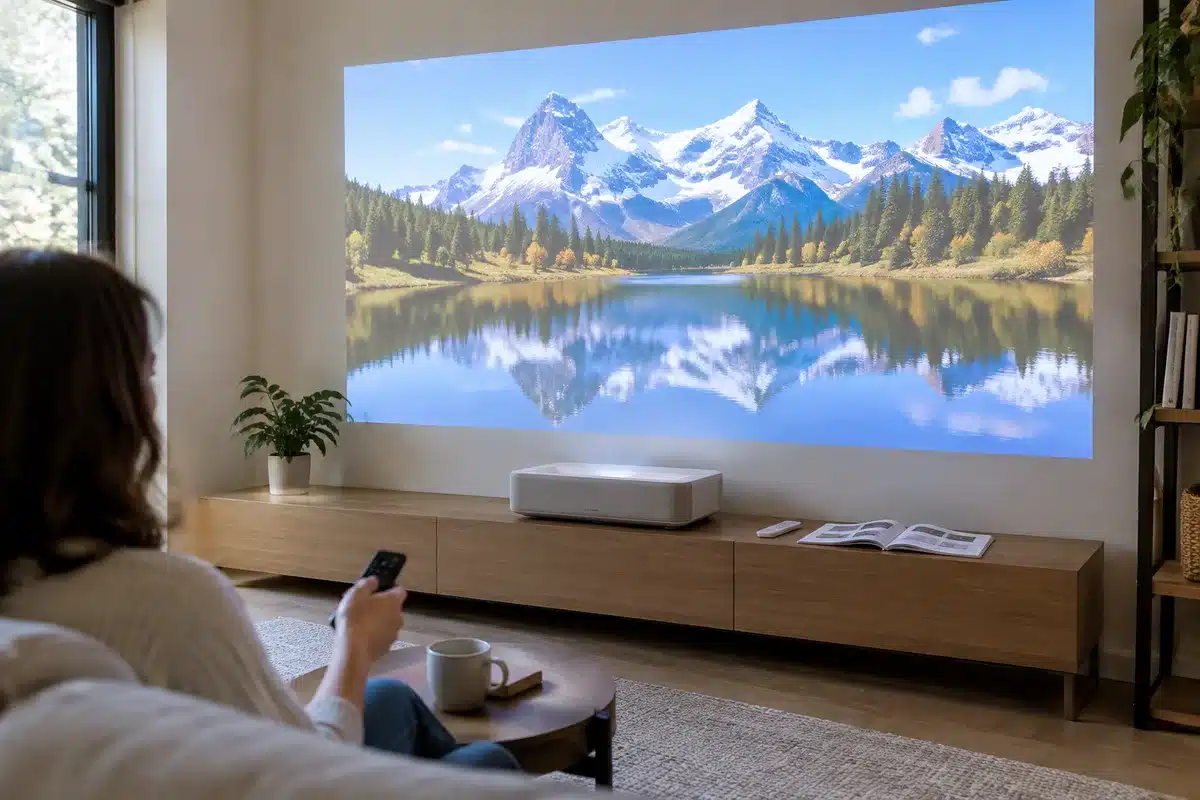
Released in July 2026, the Xgimi Mira expands the brand’s roster in the highly competitive ultra short‑throw (UST) segment. Beyond an attractive spec sheet, Xgimi positions this unit as an entry-level UST triple‑laser projector at about €1,700 at the time of writing. Unlike the concurrently announced Mira Pro, the “standard” Mira favors a more affordable price while keeping most of the characteristics that made the Aura 2 successful.
Scientists confirm: This is the most effective way to get your cat’s attention, according to new research
Elderly Couple Refuses Reserved Seats—Viral Train Standoff Sparks Fiery Debate on Courtesy
The main distinction versus the Mira Pro is brightness: the standard Mira is rated at 2000 ISO lumens while the Pro rises to 3000 ISO lumens, which helps in brighter rooms. Otherwise the hardware is largely the same (RGB triple laser, 0.39″ DMD chip, Dolby Vision compatibility, and a 36 W Harman Kardon sound system). The Mira Pro carries a roughly €300 premium and is listed around €1,999.
With an RGB triple‑laser light source specified at 2000 ISO lumens, the Mira promises a simulated Ultra HD image and supports Dolby Vision, HDR10+ and HLG. It runs Google TV and includes Google’s Gemini conversational assistant.
Because it is an ultra short‑throw design, the projector only needs about 19 cm of distance from the projection surface to deliver a 100‑inch diagonal image, and it can reach up to 120 inches depending on setup. Sound is handled by Harman Kardon with a total rated output of 36 watts.
The Mira’s market positioning is interesting: RGB triple‑laser UST 4K projection has long been confined to premium models above €3,000, but this unit helps democratize the tech. It competes with similarly priced rivals such as the Hisense PT1.
I spent several days with the Mira to evaluate it thoroughly, weighing its strengths against the compromises made to hit the target price.
Xgimi Mira — Specifications
| Model | Xgimi Mira |
|---|---|
| Lens type | Ultra‑short throw |
| Image resolution | 4K UHD (simulated) |
| Display technology | DLP |
| Brightness (ISO) | 2000 lumens |
| HDR compatibility | HLG, Dolby Vision, HDR10+ |
| HDMI ports | 3 (one with eARC) |
| ALLM | Yes |
| Operating system | Google TV |
Test conditions
The review unit was supplied by Xgimi. I tested it with a Lumene Extra Bright Eden 240C screen — a model designed specifically for UST projectors and available from Son‑Vidéo.com. Measurements were taken using professional equipment placed facing the screen to minimize errors and provide values that reflect what a viewer actually sees. This protocol is applied consistently across UST projector tests to enable meaningful comparisons.
Xgimi Mira — Design
Most projectors come in black or white (see the Epson EH‑LS800), but Xgimi gave the Mira a beige finish named Moonlight Sand, the same tone used on the Aura 2. The color breaks the usual austerity of the category and gives the device a warmer, more domestic appearance—closer to a decorative object than a purely technical appliance. The chassis is fairly compact: 46.4 cm wide, 26.8 cm deep and just 12.2 cm tall—smaller than the Leica Cine 1 and even the Aura 2.
One pleasant surprise is the weight: around 4.8 kg, considerably lighter than the nearly 9 kg Aura 2. That makes handling and placing it on an ordinary TV cabinet easier, even though UST projectors are generally not mobile devices you move daily.
A large part of the top and sides (front and rear) are wrapped in a light‑grey acoustic fabric that feels nice to the touch and gives a premium impression. The remainder of the housing is plastic in a matching tone; the finish is solid, though it doesn’t reach the metal feel of competitors like the Hisense PX3‑Pro.
Xgimi also states that the textile covering received a hydrophobic nanocoating inspired by the lotus leaf, intended to limit liquid penetration in case of accidental spills and make cleaning easier in everyday use.
Unlike the Aura 2 and Aura 3, the Mira lacks a built‑in lens cover, so the lens remains exposed to dust when idle—an unfortunate omission but not a dealbreaker. The projector sits on four small feet that are not height‑adjustable, unlike some rivals such as the Hisense PX3‑Pro or Formovie Theater Premium.
Note also the fairly large external power brick that comes with the unit; you’ll need to tuck it away behind furniture, whereas some models integrate the power supply in the chassis.
Xgimi Mira — Connections
All ports are grouped at the rear of the chassis, a standard arrangement for UST projectors. It would have been handy to have at least one HDMI and one USB‑A on the side for occasional plugging, but the back panel includes three HDMI inputs (one with eARC for audio return), enabling a console, an Ultra HD Blu‑ray player and a media streamer to be connected simultaneously.
There are two USB‑A sockets for media playback from drives, a 3.5 mm analog audio jack for headphones or external audio, and an optical S/PDIF digital output. An RJ45 Ethernet port is available for those preferring wired networking for stable UHD streaming. Wireless features include dual‑band Wi‑Fi 6 and Bluetooth 5.2 for screen sharing and pairing with external speakers or headsets.
The remote control
The supplied remote is compact and lightweight, comfortable to hold and similar to the remotes used with other Xgimi products. It uses Bluetooth, so you don’t need to point it precisely at the projector, and it houses a microphone for voice queries via Google Assistant / Gemini.
The only minor complaint is that the backlight is partial rather than full, which can make some keys hard to identify in total darkness—a common situation for movie watching. Dedicated shortcut buttons for Netflix, YouTube and Prime Video are included, along with a programmable button to launch a favorite app. The overall ergonomics are good, with straightforward controls for volume, navigation and quick access to image settings.
Xgimi Mira — Screen choices
The Mira is sold without a projection screen, so you can aim it at a plain wall or a dedicated screen. If you choose a wall, make it as flat as possible, but using an actual screen is generally the best option—especially with UST models where a purpose‑designed surface can significantly improve image quality. Screens for UST projectors vary in price from roughly €500 up to €2,700 depending on size and gain.
Xgimi Mira — Installation
As with all ultra short‑throw projectors, the first installation step is placing the unit a few centimeters from the wall or screen. For the Mira, 19 cm from the projection surface yields a 100‑inch diagonal image.
Xgimi’s ISA 5.0 system uses multiple sensors to automate image alignment and focus. Manual fine‑tuning remains possible and desirable: you can apply 4‑ or 8‑point geometric correction depending on how precise you need the image to be.
The projector also performs digital correction to reframe pixels and compensate for minor flatness issues on the wall. This works well on smooth, uniform surfaces but can struggle with textured walls, wallpaper, or decorative reliefs. A dedicated menu lets you tweak the beam’s colour balance to better suit the wall colour if you’re not using a neutral screen.
Xgimi Mira — Subjective image quality: good uniformity, some excesses at max power
Like many current models, the Mira uses a 0.39″ DMD chip from Texas Instruments combined with an RGB triple‑laser illuminator and a native Full HD micromirror array. Many pricier units opt for a larger 0.47″ chip.
The smaller 0.39″ chip helps make projectors more compact and affordable but comes with trade‑offs: lower native contrast (blacks look more gray), tougher thermal management, and optical constraints that can limit perceived image sharpness.
The Mira achieves a 4K presentation via Texas Instruments’ XPR shifting technique, rapidly projecting several offset Full HD frames to reconstruct a 4K image. Choosing an RGB laser engine instead of a laser‑phosphor one—more common in this price bracket—gives the Mira a very wide, pure colour gamut because each primary colour is produced by its own light source.
There are multiple picture presets in SDR: Standard, Film, Vivid, Game and Sport; each has an HDR equivalent, plus two Dolby Vision options (Bright and Dark). For gaming I recommend the Game mode to benefit from the latency and refresh features described in the gaming section below.
Using my usual test sequences, the Mira produced a generally soft and pleasing image for SDR content. The Film mode delivers the most restrained and faithful rendering with reasonably credible colour but some tendency toward oversaturation in parts.
With HDR material the triple‑laser engine shows its strengths: colours pop and highlights stand out more convincingly from the image. Dolby Vision brings a noticeable advantage in scenes combining very dark areas and bright elements, improving detail visibility in the extremes.
Whether streaming or playing from a Blu‑ray disc, the Mira performed well across a broad range of content—action movies, slower dramas and colour‑demanding nature documentaries. At maximum laser power, however, some highly saturated hues can look slightly unnatural; reducing the laser output tones this down considerably.
For best results with reduced laser power, I recommend darkening the room completely. Edges remain fairly crisp without appearing overly digital, and the overall image keeps a natural feel, though a touch softer than projectors employing a larger DMD. Viewing comfort over long sessions is high, whether for movies or bingeing series.
Motion handling
Native motion performance isn’t the Mira’s strongest suit. Slow horizontal pans can reveal judder, so I advise enabling the MEMC interpolation feature. Multiple interpolation levels are offered, including a “Natural Cinema” setting targeted at 24 fps film content.
In practice, the lowest MEMC intensities don’t fully eliminate the judder; an intermediate level is typically required to achieve satisfying fluidity for demanding cinematic scenes.
Rainbow effect
As a DLP device, the Mira can produce the rainbow effect, though in my viewing it remained relatively subtle. Perceived rainbows depend heavily on individual sensitivity; some viewers may spot fleeting coloured fringes around bright elements on dark backgrounds, while many others will hardly notice them.
Xgimi Mira — Measured results
The projector includes an ambient light sensor that can automatically adjust image parameters. For all my measurements the sensor was disabled and tests were done in total darkness. Film mode offers the most cinematic look.
I measured a native contrast ratio of 1483:1—respectable, but well below the 3000:1+ of some market leaders. Average gamma was 2.12, with a response that tracks well in deep blacks but dips when the image brightens, even showing a trough before the target peak. Default colour temperature averaged 7,564 K, considerably cooler than the 6500 K target, indicating a bluish tint. Red showed a noticeable bias.
Out of the box, colour accuracy is not ideal: in Film mode the average Delta E was 8.92, significantly above the perceptibility threshold of 3. That explains the slightly oversaturated appearance on-screen.
For HDR material Film mode again proved best, but colour fidelity remains off: HDR Delta E averaged 10.02, so calibration work is required for both SDR and HDR to achieve accurate colours.
Measured on the Lumene screen used for all my tests (gain = 0.5), peak luminance reached 86 cd/m²—modest for a device of this type. I also observed a strange dip in output around 55% laser power before it rose again, which is abnormal behaviour.
On the positive side, the Mira delivered one of the broadest colour gamut coverages I’ve recorded for a unit in this category for both DCI‑P3 and BT.2020 spaces.
Xgimi Mira — Gaming: a pleasant surprise thanks to the new DMD
Gaming is one area where the Mira shines. The choice of a newer 0.39″ DMD—rather than the still‑common 0.47″ panel—appears driven by responsiveness. The projector supports a “Projector Super Frame” mode that lets you switch from 4K UHD at 60 Hz to Full HD up to 240 Hz, attractive for very large‑screen gaming.
The Mira supports VRR in a specified range of 48–240 Hz in Full HD, along with ALLM so the unit automatically switches to low‑latency mode when a compatible source is detected. HGiG is also supported, allowing the game engine to handle HDR tone mapping rather than the projector, which can avoid double tone mapping and washed‑out results on some titles.
Measured input lag sits around 16.5 ms in 4K at 60 Hz, which is quite good for casual and many competitive games. Xgimi cites 1 ms in Full HD at 240 Hz with Game mode and VRR enabled—conditions that, if achieved in real play, would be excellent for very fast gameplay.
For highly competitive gamers who require the smallest possible screen and shortest viewing distance, a dedicated gaming monitor still makes more sense. But for the majority of players and for enjoying narrative or AAA titles on a two‑metre‑plus diagonal, the Mira is a very compelling option at this price point.
Xgimi Mira — Audio: balanced but limited for intensive cinema use
Audio duties fall to a Harman Kardon system rated at 36 W total: two 8 W full‑range drivers and a 20 W downward‑firing woofer. The projector supports Dolby Audio and DTS Virtual:X to simulate spatial sound without additional speakers.
Sound quality is adequate: dialogue is clear and the stereo spread is respectable for medium‑sized rooms, but the bass lacks punch during the most dynamic scenes. For casual viewing or TV series the internal sound is fine and avoids the immediate need for extra equipment. For dedicated home‑cinema usage, however, adding a soundbar or discrete audio system is advisable to match the Mira’s visual performance.
Xgimi Mira — Google TV interface: smooth, Gemini and a full app ecosystem
Software is Google TV in its latest iteration, with official Netflix certification so you get native access to Netflix without workarounds. The home screen includes the expected streaming apps—Netflix, HBO Max, Prime Video, Disney+, local services like France.tv and Arte—and the Play Store lets you install additional apps if needed, a major advantage over closed proprietary platforms.
During testing the most notable novelty was the integration of Gemini, Google’s conversational assistant, which noticeably improves voice search relevance and depth. For example, when I asked for recommendations on aviation films, Gemini returned more relevant and better‑argued suggestions than the older Assistant. On specific film trivia it provided detailed answers with sources—a handy feature for cinephiles who want more than a simple title search.
Xgimi adds its own menus on top of Google TV for projector‑specific controls. Users who want advanced calibration options are catered for: colour temperature adjustment, a two‑ and eleven‑point white balance, and a full colour management system to tweak luminance, saturation and hue for the six primary/secondary colours—depth rarely seen at this price level.
The Settings menu lets you fine‑tune brightness, enable the ambient light sensor, and control various video processing options. Navigation is fluid and the interface responds promptly to remote inputs.
Xgimi Mira — Power draw and noise
With the laser set to maximum, the Mira’s power consumption is only a little over 90 W—remarkably low for a triple‑laser UST projector and noticeably less than some rivals like the Hisense PT1 under similar conditions.
Noise levels are subdued: measured close to the unit I observed around 32–34 dB depending on brightness settings. The fan blends into the background quickly, an important advantage for a projector intended to live in a lounge area.
Xgimi Mira — Price and availability
The Xgimi Mira is listed at an SRP of approximately €1,700, placing it well below many premium 4K triple‑laser UST models and offering a compelling value proposition for those seeking an accessible route into large‑screen laser projection.
Similar Posts
- Xgimi Horizon 20 Max Review: Ultimate 4K Laser for Home Cinema Unveiled!
- I Tried the Awol Vision Aetherion Max: Ultra-Short Throw Projector Aiming for the Top
- Xgimi Titan Review: Experience Grandeur with This 4K Laser Projector
- JMGO O2S Ultra Review: Compact Ultra-Short Throw Packs a Bright Punch!
- I Tried the Leica Cine Compact 1: Experience Easy Living with 4K Laser Projection

Maya Singh is a senior editor covering tablets and hybrid devices. Her work explores how these tools reshape digital productivity and learning. She also contributes to feature editorials on emerging tech.