
Scientists confirm: This is the most effective way to get your cat’s attention, according to new research
Elderly Couple Refuses Reserved Seats—Viral Train Standoff Sparks Fiery Debate on Courtesy
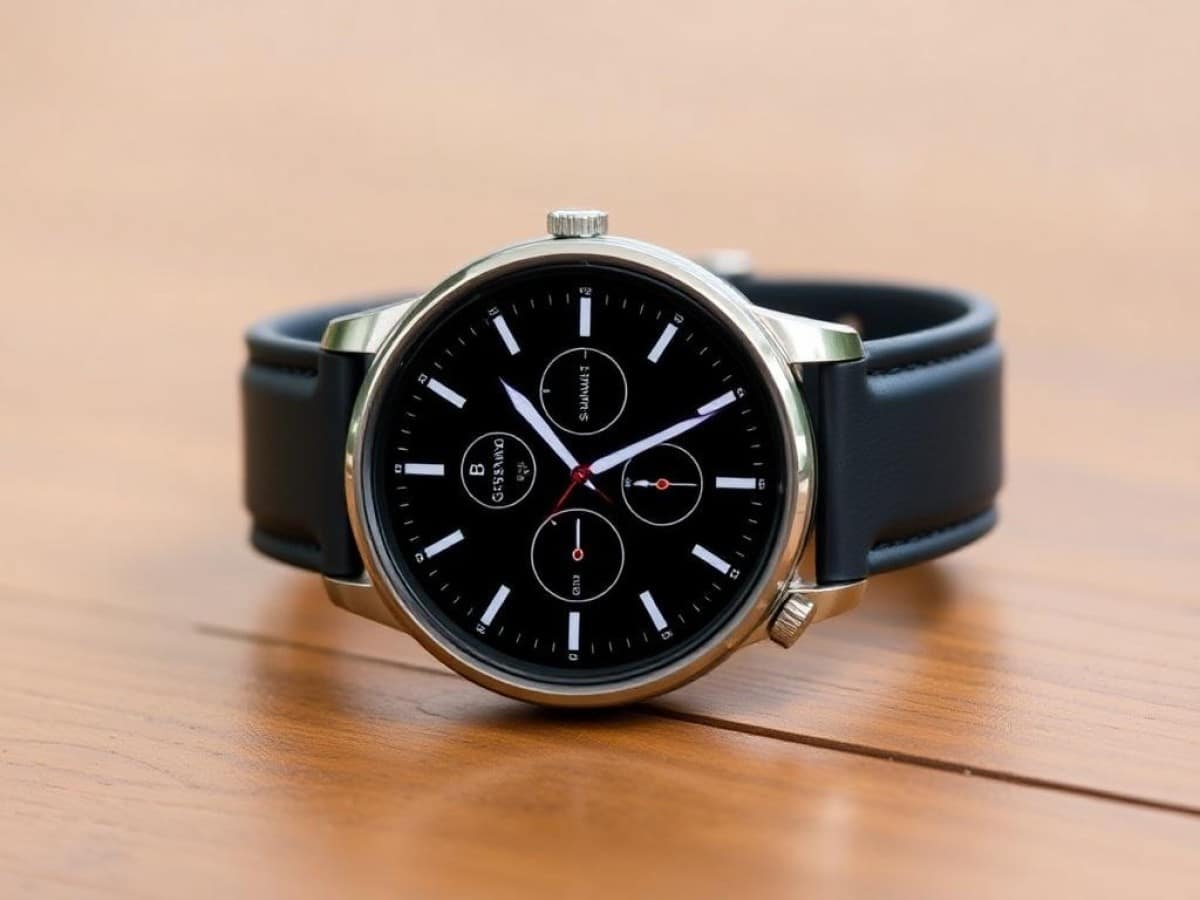
Alongside its new Galaxy Watch 8, Samsung has unveiled a new watch in its “Classic” series this year, complete with a rotating bezel, the Samsung Galaxy Watch 8 Classic. This model succeeds the previous Galaxy Watch 6 Classic, incorporating some features from the Galaxy Watch Ultra. Here’s the full review.
Note: Given the similarities between the Galaxy Watch 8 Classic and the Samsung Galaxy Watch 8, this review will focus primarily on the differences between the two models. Feel free to refer to the full review of the Samsung Galaxy Watch 8.
Samsung Galaxy Watch 8 ClassicTechnical Specifications
| Model | Samsung Galaxy Watch 8 Classic |
|---|---|
| Dimensions | 46.7 mm x 46.7 mm x 10.6 mm |
| Screen Resolution | 438 x 438 pixels |
| Panel | Super AMOLED |
| Internal Memory | 64 GB |
| Weight | 63.5 g |
| Heart Rate Sensor | Yes |
| Sleep Analysis | Yes |
| Accelerometer | Yes |
| Ambient Light Sensor | Yes |
| Protection Rating | IP68, 5ATM, MIL-STD-810H |
| Product Sheet |
This watch for the review was provided by the manufacturer.
Samsung Galaxy Watch 8 ClassicA High-Quality Smartwatch
The rotating bezel makes its return to Samsung’s smartwatches every two years. After the Galaxy Watch 4 Classic in 2021 and the Galaxy Watch 6 Classic in 2023, this year we see the arrival of the new Samsung Galaxy Watch 8 Classic.
The advantage of launching a new edition every two years — rather than annually — is that the updates, particularly in terms of design, are more significant.
Like all the watches in Samsung’s “Classic” range, the Samsung Galaxy Watch 8 Classic stands out with the integration of a mechanical rotating bezel around the screen. This bezel is notched and incorporates slightly larger teeth than on previous models. However, the effect is the same as on the brand’s previous models, with very satisfying interactions with the software interface, similar to a rotating crown.
Another notable feature of this Galaxy Watch 8 Classic is its weight. We are indeed dealing with a particularly heavy watch at 63.5 grams on the scale, compared to 34 grams for the Galaxy Watch 8 44 mm or 60.5 grams for the Galaxy Watch Ultra.
This weight is due not only to the rather large format of the case — unfortunately available in only one size of 46.7 x 46.7 x 10.6 mm — to the mechanical parts, but especially to the choice of stainless steel. Indeed, while the Galaxy Watch 8 is made of aluminum and the Galaxy Watch Ultra of titanium, the Galaxy Watch 8 Classic incorporates steel for most of the case. This makes the watch much heavier than the standard Galaxy Watch 8. However, the watch should also be more scratch-resistant than its two cousins. It is also worth noting that it features the same sapphire glass as the other models in the range to protect the screen from scratches. In terms of durability, the watch is certified 5 ATM, IP68, and MIL-STD-810H and can therefore be used for shallow water swimming, such as in a pool.
The Samsung Galaxy Watch 8 Classic is offered in two colors: black or white. In both cases, the watch incorporates a metallic color on most of the case, but the differences will actually play out in terms of the rehaut — between the bezel and the screen — and the buttons. For the rehaut, Samsung has integrated some annotations for the minutes, with a white or black background. For the buttons, the space between each key is designed not in steel, but in white or black plastic. On the black model used for this test, the result is quite successful, but this is the only element of the watch that does not feel completely premium.
Another difference with the standard Galaxy Watch 8, the “Classic” model also integrates a third button, round, circled in orange and positioned between the other two. This is a customizable action button, with functions similar to that of the Samsung Galaxy Watch Ultra. A good point to further adapt the use of the watch to one’s personal experience.
Finally, like the Galaxy Watch 8, the Galaxy Watch 8 Classic abandons the standard strap format, with a quick-release pump, in favor of a new proprietary attachment system. In practice, you will therefore need to buy compatible straps specifically for the new Samsung watches. Unfortunately. Here, the model is supplied with a “premium hybrid” imitation leather strap with a standard buckle and overstitching along the entire length. The strap is quite comfortable, although, given the integration of false horns, it is not the easiest to integrate into the case with the new mechanism. Unfortunately, the strap cannot be easily removed from the removable horns, and therefore cannot be replaced with a standard model.
Samsung Galaxy Watch 8 ClassicA Small, but Effective Screen
For the screen of the 46 mm Galaxy Watch 8 Classic, Samsung has actually reused the same panel as for the 40 mm version of the Galaxy Watch 8. This is due to a bezel that logically takes up a significant amount of space on the surface of the case.
Thus, we have a circular screen with a diameter of 1.34 inches, a resolution of 438 x 438 pixels, and a pixel density of 327 pixels per inch.
Of course, like all Samsung watches, the Galaxy Watch 8 Classic benefits from an AMOLED panel with infinite contrast and, new for the 2025 range, a peak brightness that can reach 3000 cd/m².
In practice, the screen is detailed enough that individual pixels cannot be distinguished with the naked eye, and it is bright enough for outdoor sports without any inconvenience, even in direct sunlight with reflections from the blue sky.
Additionally, the Galaxy Watch 8 Classic features adaptive lighting thanks to an ambient light sensor. The watch also includes an always-on display mode that can be scheduled for certain times. You can also enjoy many third-party watch faces that can be installed from the Samsung Wearables app or from the Google Play Store.
Samsung Galaxy Watch 8 ClassicA Customizable Action Button
The Samsung Galaxy Watch 8 Classic is equipped with an Exynos W1000 chip, 2 GB of RAM, and 64 GB of storage — compared to 32 GB for the standard model.
The watch also benefits from Samsung’s new One UI 8 Watch interface, based on Wear OS 6. To connect the watch to the phone, you will need to install the Galaxy Wearable app. It is also worth noting that the watch can work with any Android smartphone, but is not compatible with iPhones.
Galaxy Wearable (Samsung Gear)
Download for free
For most interactions with the watch, you are advised to refer to the full review of the Galaxy Watch 8, which features the same interface and menus.
However, the Galaxy Watch 8 Classic distinguishes itself from its cousin by adding two elements: the rotating bezel and the action button.
As was already the case with previous Samsung watches in the “Classic” range, the rotating bezel allows you to scroll through menus by hand, simply by turning it. From the home screen, you can thus switch from one card to another. In the app list, you can scroll up or down. Finally, during a sports session, you can quickly switch the screen from one training view to another, without having to worry about problems posed by sweat or rain with the touchscreen.
As every two years, this bezel is particularly appreciated, as its notched system allows for a real physical feedback from the software interface. It’s even more satisfying than a simple rotating crown like on Apple or Google watches.
Another new feature specific to the Galaxy Watch 8 is the arrival of the “Action” button. Already present on the Samsung Galaxy Watch Ultra, this third button, positioned between the two oblong buttons, will serve as a shortcut for certain actions. For example, you can assign it the “My Workouts” menu of Samsung Health, activation of the stopwatch, the voice recorder, or the flashlight. You can also choose whether the launched function is triggered with a short press or a double press. However, no function can be assigned to a long press on the action button.
During a workout, the action button will also serve to pause the session (with a short press) or to move to the next step (double press) in the context of interval training. A long press will pause the activity and suggest ending it.
Finally, the Galaxy Watch 8 Classic benefits from all the functions also integrated into the Samsung Galaxy Watch 8, such as the arrival of Google Gemini instead of Google Assistant and Bixby, the new interface of the cards to the right of the dial, or the Now Bar to easily find an ongoing action, directly from the dial. For all these points, feel free to check out our review of the Galaxy Watch 8.
Samsung Galaxy Watch 8 ClassicEffective Health Tracking, but GPS Still Lacks Precision
For health and physical activity tracking, the Galaxy Watch 8 Classic includes the same functions as the Galaxy Watch 8. Thus, we find the same heart rate sensors, GPS tracking, SpO2 measurements, electrocardiogram, or antioxidant index.
The Precision of the GPS of the Samsung Galaxy Watch 8 Classic
Like all recent Samsung watches, the Galaxy Watch 8 Classic includes a dual-frequency GPS chip (L1+L5) that is also compatible with the Galileo, Glonass, and Beidou constellations.
To assess the precision of the GPS tracking, I wore the watch in various environments (open park, narrow streets, and athletics track) during several running outings. I then compared the measurements and traces to those of a high-end sports watch, the Garmin Forerunner 970, whose tracking will serve as a reference here.
| Runs | Reference | Samsung Galaxy Watch 8 Classic | Difference |
|---|---|---|---|
| Run 1 (track) | 9.936 km | 10.440 km | +5.07 % |
| Run 2 (city) | 12.294 km | 12.640 km | +2.81 % |
| Run 3 (park) | 12.876 km | 13.150 km | +2.13 % |
| Total | 35.106 km | 36.230 km | +3.20 % |
As was already the case with the standard Galaxy Watch 8, we note a rather significant discrepancy when we rely solely on the measurements displayed by the Galaxy Watch 8 Classic during training or within the Samsung Health app afterward. However, by exporting the data from the GPX file offered in
Similar Posts
- Galaxy Watch8 and Watch8 Classic Hands-On: True Innovations Exceed Expectations!
- Samsung Galaxy Watch 8 Review: Sleek Design Meets Innovative Features
- I Tried the Samsung Galaxy Watch Ultra 2: Brilliant Timepiece, But Not for the Rugged Path
- Samsung Galaxy Watch 4 Update Arrives: Not the One You Expected!
- Galaxy S26 Ultra: Samsung’s Risky Bet on This Small Detail Could Surprise You!

Maya Singh is a senior editor covering tablets and hybrid devices. Her work explores how these tools reshape digital productivity and learning. She also contributes to feature editorials on emerging tech.