
Scientists confirm: This is the most effective way to get your cat’s attention, according to new research
Elderly Couple Refuses Reserved Seats—Viral Train Standoff Sparks Fiery Debate on Courtesy
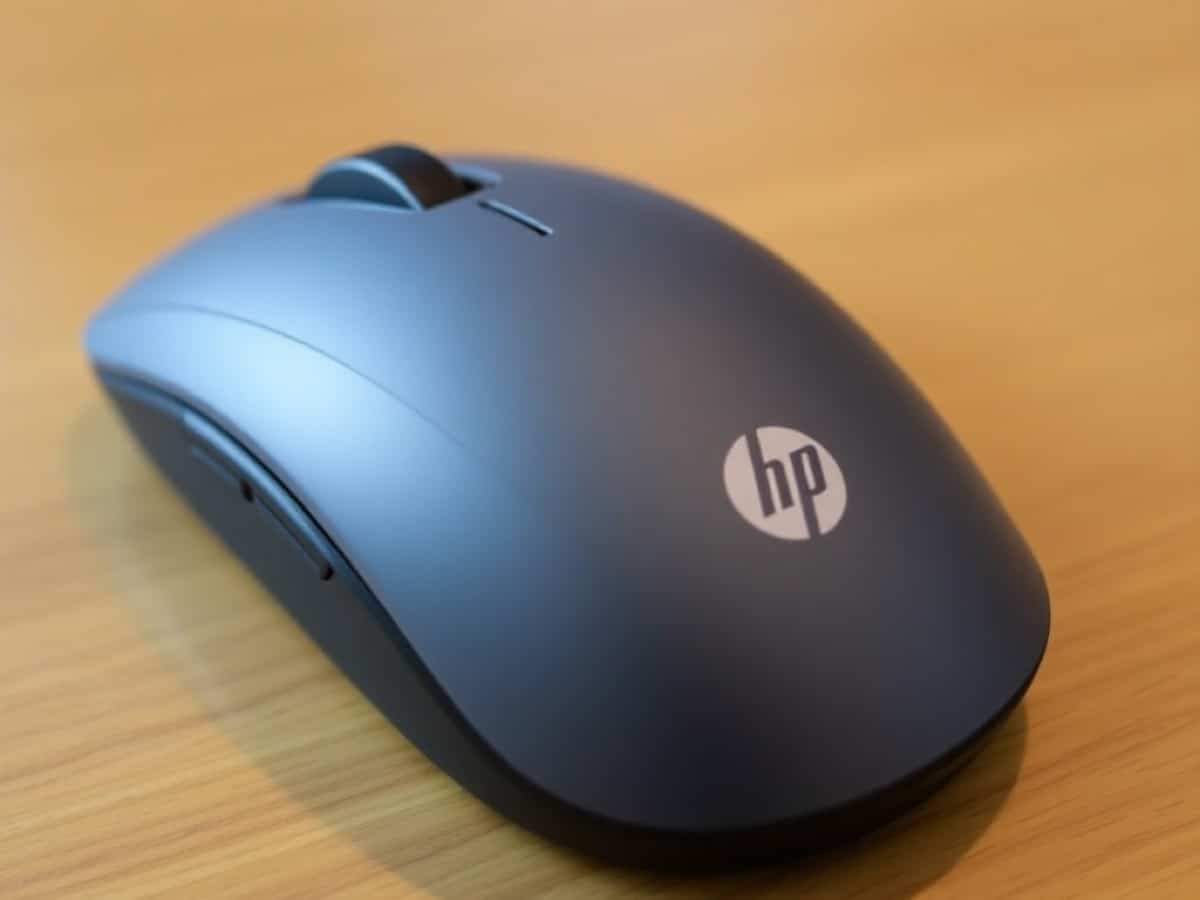
The HP Ultra-Fast Scroll Wireless Mouse 785M is a wireless, ergonomic mouse designed for office work and productivity. Taking clear inspiration from the Logitech MX Master 4, it features several customizable buttons and a secondary thumb-operated scroll wheel. It can connect via Bluetooth or through a Unifying USB dongle and boasts ultra-fast charging capabilities.
Like its direct competitor, it is equipped with quiet buttons and a magnetic scroll wheel that can be switched between a free-spinning and a ratcheted mode, ensuring smooth and fast scrolling. Additionally, the 785M comes with dedicated software which allows for customization based on user needs.
This serious contender to the MX Master 4 is priced at 100 euros, which is 130 euros less than its counterpart at launch—a significant point in favor for a mouse that, on paper, looks very similar.
Technical Specifications
| Model | HP Ultra-Fast-Scroll Wireless 785M |
|---|---|
| Connection | USB C, 2.4 GHz, Bluetooth |
| Maximum Sensitivity | 6000 DPI |
| Number of Programmable Buttons | 6 buttons |
| Weight | 123 g |
| Product details |
Dual Wheels and Convincing Ergonomics
The 785M from HP presents an unmistakably ergonomic design, visually appearing as a sizable device due to its wide base designed to comfortably accommodate the thumb and other fingers. However, in hand, the experience may not be as expected, although the mouse remains quite comfortable despite weighing over 120 grams.
Despite its size, the mouse is rather compact and occupies the front part of the hand. With medium-sized hands, the base of my knuckles naturally positions itself at the rear of the mouse, which does not make full contact with the palm. For comparison, most ergonomic gaming mice seem to fill the hand better.
Aside from its central metal scroll wheel, this competitor to the MX Master 4 is primarily made of plastic. The chassis and main buttons are covered with a typical hard plastic, while the areas in contact with the palm and remaining fingers feature a very pleasant peach-skin type coating. The overall gray anthracite tones once again remind us of the competition.
To enhance productivity, the mouse features several additional buttons. In addition to the particularly quiet primary clicks, two buttons are placed on the edge of the left click. These are easily accessible, although the one further back requires a bit of an unnatural stretch to reach. Notably, these two additional buttons effectively replace those usually found under the thumb.
The magnetic scroll wheel that names the mouse is accompanied by a central button that allows switching between its two modes of operation. It can be either completely free and smooth or offer slightly marked notches, with automatic disengagement depending on the applied force. This is a familiar feature in the competition, but it remains a practical and pleasant feature for daily use.
Although the absence of buttons on the left side is noticeable in the first few minutes of use, they are replaced by a second scroll wheel positioned just above the resting thumb. Its use is particularly easy, and it offers sufficient resistance (though not quite smooth enough) to prevent accidental activation.
Underneath the mouse’s substantial base, there is a power switch and a button that switches between three connected devices. Movement is facilitated by four generous gliding pads, and a removable lower part allows for storing the dongle during transport.
Dual Connection Options with Generous Battery Life
The connectivity options are varied with this model, which can function using Bluetooth as well as a multi-device dedicated USB adapter. Two distinct devices can also be connected via Bluetooth, with switching between them facilitated by a dedicated button under the mouse.
Regarding battery life, the brand promises up to a month of use away from a power source. This is a generous estimate and indeed consistent with our measurements after a full initial charge. Through its USB port, exclusively for charging, HP promises to fully charge the 785M in just three minutes. This will depend on the charger used because in our case, using a standard wall charger, the mouse only regained about half its battery in approximately ten minutes.
A Dedicated Software for Customization
Right out of the box, the HP Ultra-Fast Scroll Wireless Mouse 785M already offers several shortcuts associated with its various buttons. The two left-side buttons are logically used for “forward” and “backward” functions but also benefit from a secondary action. Holding them while scrolling the wheel will respectively act on zooming a web page and on the system’s volume.
To delve deeper, similar to its gaming cousins at HyperX, the 785M benefits from a dedicated driver: HP Accessory Center. The tool notably allows for reassigning the different mouse buttons with numerous system or application-related functions. Distinct configurations can also be created for each application. Handy.
In terms of productivity tools, there’s the “Layout Board,” a feature that creates six action zones all around the screen, which really act as additional buttons for the mouse. An action wheel, similar to Logitech’s Action Ring, is also included. This can be activated from any button and offers up to eight additional shortcuts around the cursor.
Even better, these shortcuts can integrate with certain applications natively. At the time of our testing, the Office suite really benefits and offers quick access to common functions of Word, Excel, and PowerPoint. Photoshop is also among the compatible software, with the ability to quickly activate certain essential tools.
A tab is dedicated to adjusting the sensor sensitivity, which can be set from 800 to 6,000 DPI. Here is also where you would adjust the operation of the detachable wheel. Even the lateral wheel has its own options to modify its speed or to reverse the scrolling direction.
A good point to note: the various settings dedicated to the mouse’s operation (key assignments, performance) are stored in the internal memory and thus do not require the HP Accessory Center to be launched. However, we observed that the connection to this management software is impossible when the mouse is used via Bluetooth on macOS. Additionally, on Mac, some operational oddities were noticed, though these do not seriously affect the use of the mouse.
Price and Availability of the HP Ultra-Fast Scroll Wireless Mouse 785M
The HP Ultra-Fast Scroll Wireless Mouse is priced at a suggested retail price of 100 euros.
HP Ultra-Fast-Scroll Wireless 785M
at the best price
There are currently no offers available, discover
-
Logitech MX Master 3S
90 €
8/10
Read the test -
Logitech G502 X Plus
99 €
9/10
Read the test -
Corsair Sabre V2 Pro Ultralight Wireless
80 €
8/10
Read the test
Similar Posts
- Logitech MX Master 4 Review: Is This the Best Office Mouse Ever?
- Razer Basilisk Mobile Review: Top Choice for Mobile Gamers!
- Discover the Corsair Sabre v2 Pro Ultralight Wireless Review: Featherlight Precision
- Ultimate Gaming Experience: I Tested the SKILLKORP Ambi One Ergonomic Ambidextrous Mouse!
- Corsair Scimitar Elite Wireless SE Review: Unleash MMO Gaming Superiority!

Maya Singh is a senior editor covering tablets and hybrid devices. Her work explores how these tools reshape digital productivity and learning. She also contributes to feature editorials on emerging tech.