
Scientists confirm: This is the most effective way to get your cat’s attention, according to new research
Elderly Couple Refuses Reserved Seats—Viral Train Standoff Sparks Fiery Debate on Courtesy
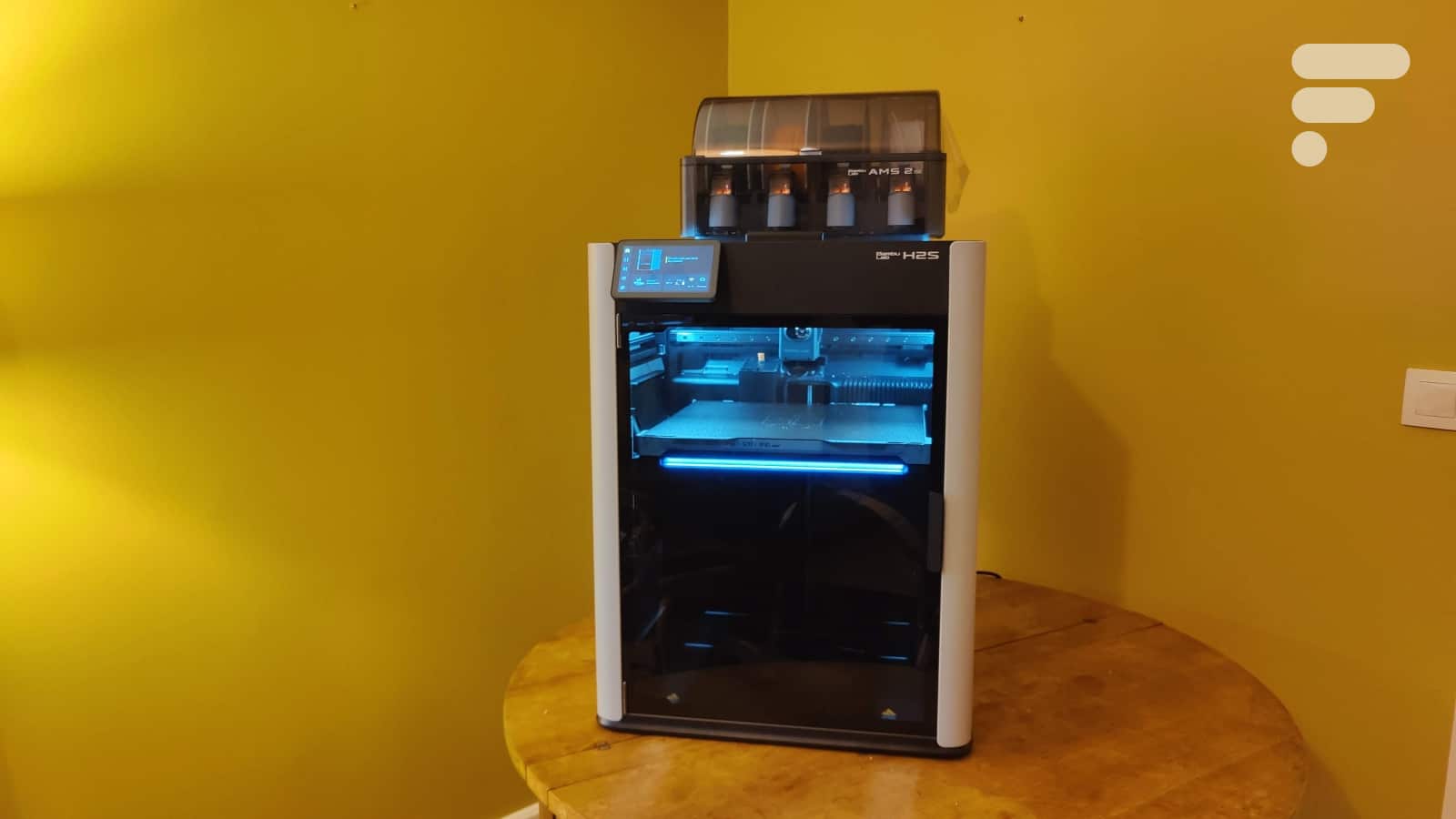
The range of 3D printers from the Chinese manufacturer Bambu Lab includes both consumer-friendly models and high-end products. While the brand is already known for offering excellent 3D printers for beginners, its premium segment is equally compelling. This is the context in which the H2S we are reviewing was designed.
Bambu Lab H2SSpecifications
| Characteristic | Value |
|---|---|
| Machine Dimensions | 586 × 683 × 605 mm (with AMS Pro 2) |
| Weight | ~35 kg |
| Print Volume | 340 × 320 × 340 mm (36.9 liters) |
| Technology | FDM (Fused Deposition Modeling) – CoreXY |
| XYZ Resolution | 0.05 mm (Z) / 0.1 mm (XY) |
| Maximum Travel Speed | 1,000 mm/s |
| Maximum Acceleration | 10,000 mm/s² (vs 8,000 mm/s² on H2D) |
Temperatures and Materials
| Maximum Nozzle Temperature | 350°C |
| Maximum Bed Temperature | 120°C |
| Maximum Chamber Temperature | 65°C (active heating) |
| Compatible Materials | PLA, PETG, ABS, ASA, TPU, PA, PC, PA-CF, PPA-CF |
Multicolor System
| Simultaneous Colors | 4 (via AMS Pro 2) – expandable up to 16 |
| System Type | AMS (Automatic Material System) |
| Principle | Single-nozzle with purge between changes |
| Additional Cost | 250 euros (vs standalone version) |
Connectivity and Interface
| Connectivity | Wi-Fi 6, Bluetooth, Ethernet, USB |
| Screen | 5-inch color touchscreen, adjustable |
| Cameras | 2 (print chamber + toolhead) |
| Sensors | 23 different sensors |
This review was conducted with a printer sent by the brand
Bambu Lab H2SDesign and Ergonomics: Robustness and Premium Finishes
A Construction that Inspires Confidence
From the moment of unboxing, the H2S makes an impression. This nearly 35 kg machine features a particularly rigid extruded aluminum chassis, designed to absorb vibrations caused by high-speed printing. The design incorporates Bambu Lab’s visual signature, with its smoked glass panels and sleek industrial aesthetic.
Bambu Lab has not compromised on essentials: the construction remains exceptionally robust with meticulous finishes. The visible differences from previous models are limited to the absence of side windows (probably a cost-saving measure) and a new, more compact and lightweight single-nozzle print head.
The enclosed chamber includes an active heating system capable of reaching 65°C, essential for printing technical materials like ABS, ASA, or PC. A flap on the top opens automatically (be careful not to leave anything in this area!) according to thermal needs: for PLA, which dislikes excessive heat, the machine naturally ventilates to prevent an oven effect. For ABS, which requires thermal stability, everything remains closed.
The 5-inch touchscreen, more generous than on previous models, offers excellent readability and can be tilted at a good angle upwards, making it convenient for viewing. The menus retain the exemplary ergonomics that have earned Bambu Lab its reputation.
The filament change system, and thus color change, AMS Pro 2, is positioned above or beside the printer and can accommodate up to 4 spools of filament, with easy access for loading.
However, the substantial size of 586 × 683 × 605 mm with the AMS requires a dedicated space. The significant weight of 35 kg necessitates the presence of two people to move the machine and requires a sturdy table.
Bambu Lab H2S
at the best price
-
Bambu Lab
1,399€
Setup: Simple and Quick
As is typical with Bambu Lab, the startup process is exemplary. The H2S is delivered pre-assembled in neatly packaged with an eclipse system at the bottom allowing the machine to be lifted from the top without strain. The setup is limited to a few simple operations that take about 15 to 30 minutes.
First, you must remove the safety blocks that secure the bed and the head during transport. These blocks should be kept carefully for any future moves. Then, cut the zip ties that immobilize the print head. Finally, you can install the side spool holder, this step being optional and intended for use without AMS or for special materials like TPU.
In the Combo version tested, the AMS Pro 2 comes already mounted, delivered inside the printer. Just connect the PTFE tube and the connecting cable to the machine, and the system automatically detects itself. Interestingly, the first AMS does not need a dedicated power supply, unlike additional modules that require one for the drying function.
The only downside, in my opinion, is the power button, located at the back, which can be inconvenient depending on your setup. If the machine is against a wall, which is often the case given its size, you will need to move it to turn it on, a detail that becomes annoying in daily use.
Accessibility for Maintenance
Maintenance is generally well thought out. The nozzle change system adopts the “quick-swap” mechanism from the A1: remove the silicone sock, release a clip, tilt the hotend. Simple and quick, even though the nozzle is rarely changed in practice. A spare 0.4mm nozzle is provided in the toolkit. The removable PEI textured bed makes cleaning and removing parts easier. Access to fans, hotend, and guide rails for greasing remains straightforward.
However, some aspects complicate maintenance on a day-to-day basis. The rear filament feed poses problems for rigid materials like PA-CF or PC, as well as for very flexible materials that do not tolerate tight bends. The substantial weight of 35 kg makes moving the machine cumbersome if you need to access the back. Fortunately, a direct inlet allows feeding TPU directly into the print head from the inside, partially circumventing the issue of rear feeding.
Multicolor System Ergonomics (AMS Pro 2)
The AMS Pro 2 is particularly well-developed in terms of ergonomics. Positioned above or beside the machine, it provides easy access to the 4 spools. Filament loading is simplified by visual guides on the screen and automatic spool detection.
The integrated drying system (up to 70°C) keeps the filaments in optimal conditions, which is particularly valuable for hygroscopic materials like nylon or PETG. The RFID detection works flawlessly with Bambu Lab filaments, although it requires manual setup for third-party spools.
The purge between color changes is intelligently performed, with automatic optimization of volumes according to color transitions. The system can use either a dedicated purge tower or the object infill as a transition area to minimize waste.
Bambu Lab H2SSoftware and Interface: Excellent but Closed
Bambu Studio: A Modern Benchmark
Bambu Studio continues to evolve positively and stands out as one of the most refined slicers (software for preparing prints) on the market. The interface is modern, clean, and designed to provide a frustration-free experience, even for beginners. The predefined profiles work right away, the automatically generated support structures are effective, and the print time simulation is remarkably accurate to reality.
The software impresses us in several ways:
– The intuitive interface is easy to grasp,
– The pre-configured profiles optimized for each material,
– and the intelligent support generation with the option for manual painting,
– The complete simulation of the print allows for layer-by-layer visualization,
– The management of joints and seam placement is customizable for advanced users.
For multicolor printing, Bambu Studio offers specific features: direct painting on the 3D model allows for visually intuitive color assignment, automatic purge sequence optimization limits unnecessary movements. You can choose between a purge tower or object infill as a transition zone, which helps reduce waste. The intelligent management of color changes minimizes back-and-forth movements, and the 3D visualization of the necessary purge volumes helps anticipate material consumption. Fine-tuning of purge flows according to color transitions further optimizes the process.
The downside is the total lack of native compatibility with popular slicers on the market. The H2S only works with Bambu Studio. No profiles are available in OrcaSlicer, PrusaSlicer, Cura, or Simplify3D. A developer mode exists in theory, but it requires forgoing cloud functions and part of the software security through a third-party connection software. This restriction, officially motivated by security and cloud integration reasons, may deter the most advanced users.
Complete Connectivity Options but Dependent on the Cloud
The H2S is equipped with Wi-Fi 6, which offers a stable and fast connection, with simplified setup via QR code from the first startup. Bluetooth allows immediate pairing with the mobile app without complex manipulation. An Ethernet port is available for professional setups that require maximum stability and avoid the uncertainties of wireless. Finally, the USB port allows for local printing without a network, which is useful for particularly large files or when the Bambu cloud is unavailable.
Wi-Fi configuration takes just a few seconds at startup, guided by the intuitive touchscreen interface, while pairing with the Bambu Handy app via QR code is just as simple and quick.
Bambu Handy Mobile App
The mobile app perfectly complements the user experience. The interface is fluid, clear, and provides access to all essential functions. You can start and stop prints remotely, which is particularly convenient when you are not near the machine. The real-time tracking displays an accurate progress percentage that corresponds faithfully to reality.
Live camera access allows you to monitor the print. Push notifications inform you of the end of printing or the detection of problems. The app also provides access to Maker World, Bambu Lab’s 3D model library, and allows the management of multiple queues to automatically chain prints. The integration with MakerWorld is smooth and enriching: a simple click on a model, and it’s in your print queue with the right pre-configured settings.
Cameras and Monitoring
The H2S includes two cameras that perform complementary functions. The chamber camera ensures real-time print surveillance with failure detection by artificial intelligence. This camera has saved several prints during our tests, detecting poorly attached supports or early signs of detachment before turning into a spaghetti disaster. The toolhead camera, facing downwards, is used for bed calibration and precise detection of the print head’s position.
Advanced Features
23 embedded sensors continuously monitor all aspects of the print:
- Temperature sensors (nozzle, bed, chamber, electronic components)
- Humidity sensors in the AMS
- Vibration detection for active compensation
- Monitoring of motor current
- Filament flow detection and jamming
Input Shaping (vibration compensation): Calibrated during the first startup (4 minutes), this system analyzes the printer’s mechanical resonance model to actively compensate for vibrations. The result: high-speed prints without ringing artifacts, maintaining quality even at 600-800 mm/s.
Active heated chamber: Control up to 65°C with automatic ventilation flap according to the materials used. The system is intelligent: it opens for PLA, closes for ABS. No need to think about it.
Specific AMS Pro 2 Features
- Automatic drying: Dehydration up to 70°C per slot, programmable in duration
- RFID detection: Automatic recognition of Bambu Lab filaments with optimal profile loading
- Automatic reloading: If a spool ends, the machine automatically switches to the next slot (requires the same material and color)
- Scalability: Up to 4 AMS can be connected, allowing for a maximum of 16 simultaneous filaments
Limitation: Automatic material detection works perfectly with Bambu Lab filaments equipped with RFID chips, but requires manual setup for third-party spools.
Bambu Lab H2SOur Print Tests
All tests were conducted with the default profiles from Bambu Studio, without specific optimization, to evaluate the “out-of-the-box” experience that a typical user would have.
XYZ 20mm Calibration Cube
Measured dimensions with a digital caliper:
- X: 20.02 mm (+0.02 mm / +0.1%)
- Y: 19.98 mm (-0.02 mm / -0.1%)
- Z: 20.01 mm (+0.01 mm / +0.05%)
Analysis: The dimensional accuracy is impressive with a maximum deviation of only 0.02 mm on each axis, well within the expected tolerance for FDM. The angles are perfectly square at 90°, the flat surfaces are without warping
Similar Posts
- Elegoo Centauri Carbon 3D Printer Review: Perfect Starter Machine Unveiled!
- Google Drive Boosts Scanning With New AI-Powered Scanner: Transform Your Documents Faster!
- Android 16 Update: Google to Fix Major Flaw in Material 3 Expressive Design!
- Black Friday Deals: Aqara FP2 Just €58 – Discover More Discounts!
- Tapo RV50 Pro Omni Review: Discover Your New Daily Companion!

Maya Singh is a senior editor covering tablets and hybrid devices. Her work explores how these tools reshape digital productivity and learning. She also contributes to feature editorials on emerging tech.