
Scientists confirm: This is the most effective way to get your cat’s attention, according to new research
Elderly Couple Refuses Reserved Seats—Viral Train Standoff Sparks Fiery Debate on Courtesy
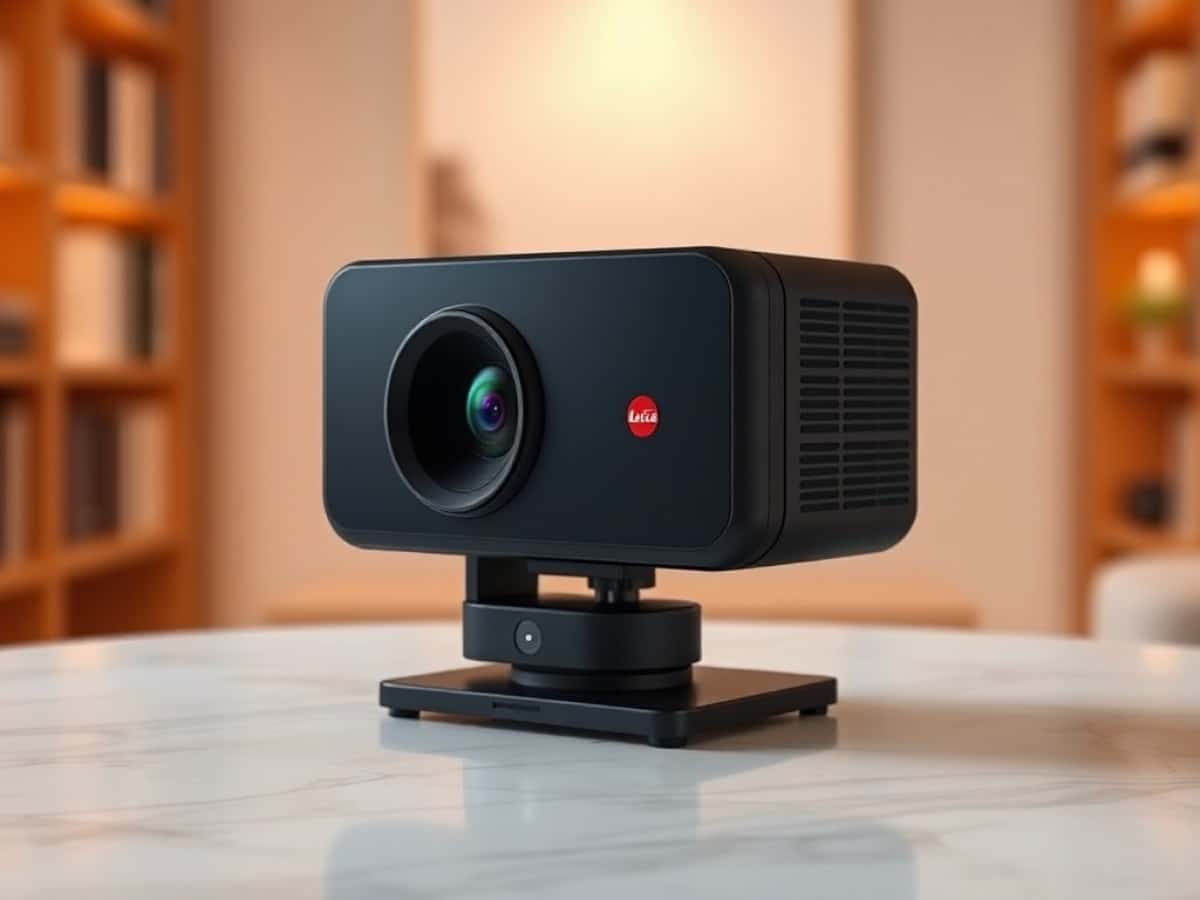
The Leica Cine Compact 1 expands the brand’s presence in the home cinema market. Following the ultra-short-throw Cine 1 model, designed to project a 150-inch image from just a few centimeters away from a wall or screen, and the Cine Play 1, a model with a standard focal length, the brand now offers a more compact 4K laser projector that can be placed on a table, aimed at a wall, a screen, or even a ceiling for temporary use or more permanent setups.
With its integrated gimbal allowing 360-degree orientation, the Cine Compact 1 competes with the less expensive Hisense M2 Pro and JMGO N3 4K, or the Xgimi Horizon 20 which boasts greater brightness at a similar price. In terms of size and brightness, it doesn’t match the ultra-compact Samsung FreeStyle 2 or Xgimi MoGo 4 Pro, as these models are much smaller and less bright.
Leica officially rates this projector at 1700 lumens, which is impressive and allows for use in a lit room. Technically, it relies on a 0.47-inch DLP chip paired with a direct RGB triple-laser light source, providing a simulated 4K 3840 x 2160 pixel image, supporting major modern HDR formats including Dolby Vision, HDR10, HDR10+, and HLG.
What sets it apart from the competition, besides its polished design, is the inclusion of Leica Image Optimization (LIO) technology, which helps maintain consistent image quality regardless of the format or projection size selected, continuing what the brand emphasizes in its other products.
The device presents itself as a complete system with its connected Vidaa platform (courtesy of Hisense), Wi-Fi 6 compatibility, Bluetooth 5.4, AirPlay, and integrated streaming apps. The promise is straightforward: to offer a projector that is compact enough to be moved easily, bright enough to project large images under various conditions, and premium enough to compete in image quality with bulkier, less mobile living room models.
In this context, I approached the Leica Cine Compact 1 as a hybrid solution, capable of delivering serious cinema sessions at home while also being suited for more casual and spontaneous use, to see if it truly holds its ground against the best compact 4K projectors currently available.
Why You Should Never Reheat These Foods in the Microwave – The Hidden Dangers Experts Warn About
I tried the top 5 guard dogs—here’s what makes these breeds the ultimate protectors
Leica Cine Compact 1Technical Specifications
| Model | Leica Cine Compact 1 |
|---|---|
| Type of Lens | Standard Short Throw |
| Image Resolution | 4K UHD |
| Technology | DLP |
| Brightness (ISO) | 1700 Lumens |
| HDR Compatibility | HDR10, HLG, Dolby Vision, HDR10+ |
| Number of HDMI Ports | 1 |
| ALLM | Unknown |
| Operating System | VIDAA |
| Product Sheet |
Testing Conditions
The Leica Cine Compact 1 projector tested was loaned to us by the brand. It was tested in conjunction with a Lumene Movie Palace UHD Platinum 300C screen. Measurements were carried out with professional equipment directly in front of the screen to minimize errors and provide values that reflect what the viewer actually sees. This protocol is the same for all projector tests to enable comparison.
Leica Cine Compact 1Design, a Classy Aluminum Case
The Leica Cine Compact 1 sports an almost cubic silhouette: 209 x 226 x 193 mm on the scale for about 4.4 kg. Grey metal chassis, slightly textured surfaces, glass front — the whole exudes a premium feel, far removed from the mini plastic projectors that populate this market. On top, the Leica signature is discreetly present with the famous red dot. The device thus slips easily into a living room, placed on a coffee table or a shelf, without being overtly techy.
The integrated gimbal base is undoubtedly the highlight of the design. It allows true 360-degree rotation on the vertical axis. Thus, you can project onto a wall, but also onto the ceiling for a session while lying in bed, for example. This freedom of orientation enhances the product’s nomadic nature: you place the Cine Compact 1 on a roughly stable surface, play with the rotation, and find the angle in just a few seconds.
Note that in terms of rotation, there is no pivoting support underneath but a rubber coating that ensures it does not slip on a surface that might not be perfectly flat. Therefore, it must be lifted to pivot. This is not the case with the Cine Play 1, which has a truly pivoting base.
The finish of the base is meticulous, the movement is smooth yet firm enough that the device doesn’t move an inch, even when grabbing the remote or brushing against the case.
On the front, you can see the lens accompanied by a few sensors (for focusing and keystone correction, if necessary). The surface is black and reflective glass.
On the sides and back, the device is peppered with a multitude of small holes, which not only conceal the speakers but also ensure cooling of the product.
The lines are clean. Its body is made of solid aluminum. There are no flashy lights, no intricate shapes: you sense an object designed to last, in the purest Leica tradition. Like the competition, the projector comes with a hard transport case made of fully recyclable expanded polypropylene. This helps with transporting and storing the device.
Inside, you can store the remote as well as the power cable (which is relatively long) with its transformer that is thankfully very compact.
This is not just a pico-projector, but rather a true living room projector that can be moved without effort. The overall impression is that of a dense, well-assembled object with clean joints, which reassures as soon as you handle it. Compared to compact competitors, often very plastic, Leica clearly plays in a different league.
Leica Cine Compact 1Connectivity
The connectivity is minimalist, which fits the “portable” nature of the device but may puzzle those used to better-equipped living room projectors. It features a single HDMI 2.1 input compatible with eARC, intended for the main source: console, Ultra HD Blu-ray player, or multimedia box. This port handles 4K signals up to 60 Hz, 2K up to 120 Hz or 240 Hz, and audio return to a compatible soundbar or amp.
Next to it, a USB-A 3.0 port accepts a flash drive or hard drive for direct playback of movies, series, or photos via the built-in player in the Vidaa OS. However, there is no RJ45 Ethernet port, no optical S/PDIF output, no analog output: those used to extensive wiring will be left wanting. Leica relies on wireless networking and on eARC for external sound. The logic holds for a nomadic projector, but it requires planning the layout of devices in the room.
The wireless connectivity, on the other hand, is quite comprehensive: Wi-Fi 6 (2.4 and 5 GHz), Bluetooth 5.4, AirPlay compatibility, and even HomeKit integration depending on the setup. It’s easy to stream from a smartphone, tablet, or computer, connect Bluetooth speakers if the built-in speakers are insufficient, and enjoy streaming apps without any HDMI source. Those used to connected TVs will not feel out of place, with minimal wiring required: just the power supply, possibly a soundbar via eARC, and that’s it.
The Remote Control
The remote control adopts the ergonomic and visual language already seen on Vidaa devices. It’s elongated and fairly slim, with well-spaced buttons: the grip is immediate and navigating the interface is intuitive. At the bottom, dedicated buttons for Netflix, Prime Video, Disney+, and YouTube launch these services directly, bypassing the home screen — a real convenience for everyday use.
Other buttons manage volume, playback, and direct access to image and sound settings (P Mode and S mode). One can thus configure the device in the middle of viewing without diving into three levels of submenus. The connection to the projector is via Bluetooth, which does not require precise aiming, and an integrated microphone opens up Vidaa Voice voice commands for launching an app or searching for content by voice.
The remote’s simplicity is appreciated: compact, it fits in the case with the projector without compromising ease of use. Two caveats, however: the lack of backlit buttons, which is noticeable when using the Cine Compact 1 in complete darkness — but the criticism applies to almost all remotes of this kind, and the position of the Back button, which is here placed above the directional wheel. When one is used to having it positioned at the bottom left of the latter, it takes a little time to adapt. Overall, it remains true to the spirit of the product: simple, direct, capable of controlling both basic functions and more precise adjustments without unnecessary complexity.
Leica Cine Compact 1The Screen
The Cine Compact 1 is delivered without a screen. More freedom, therefore, but also a temptation when the budget is tight: to settle for a wall as a projection surface, and thus lose the benefit — not insignificant — of an optimized surface. Count on spending between 500 and 2700 euros for screens of different sizes, specifically treated for projection.
Leica Cine Compact 1Installation
The setup is quite standard: several meters away depending on the desired image size. With an optical projection ratio of 1.0 to 1.3, the device covers diagonals from 60 to 220 inches, which in practice means distances of 1.5 to more than 4 meters for the largest sizes.
Concretely, count on an image diagonal of 168 cm for a setback of 1.5 m. If you place the device at 2.2 m, you get a 100-inch image (2.54 m) diagonally. With a setback of about 3 m, you can aim for a 3 m image base. If necessary, the Summicron zoom provides the flexibility needed to adapt the image to the depth of the room without compromising sharpness. This is one of the great strengths of this device.
The gimbal base changes the game during setup. Rather than stringing together digital keystone or rotation corrections, you rotate the projector to roughly align the image with the surface — white wall, technical screen, or stretched canvas, it doesn’t matter.
Autofocus and automatic keystone correction take over, detecting the position of the projector using a sensor module and a Time-of-Flight distance measurement. Most of the time, no manual intervention on the geometry is necessary to obtain a well-framed and sharp image.
The Cine Compact 1 also includes eye protection, which instantly cuts off the beam whenever a person or animal passes in front. Reassuring, in a living room or bedroom where people move around.
To refine the framing, an intelligent resizing system readjusts the projected size without moving the device — valuable when maneuvering space is limited. Naturally, if necessary, you have control over the manual keystone and focus adjustments to achieve a perfectly rectangular image over the entire surface. Note the possibility of adapting the image to the color of the wall.
The setup is done in a few seconds, whether in a dedicated room or an improvised corner. You place it, point it at the surface, let the autofocus and automatic keystone do their job, then adjust the zoom to the available distance. This simplicity is one of the great advantages of the Cine Compact 1, designed for impromptu cinema evenings at home or at friends’ places.
Leica Cine Compact 1Image in Subjective Mode
In terms of image, the Cine Compact 1 combines a 0.47-inch DLP Pico chip, a direct RGB triple laser, and Summicron optics, for a very convincing 4K definition but always simulated from a 1080p base. The 3840 x 2160 pixel resolution, supported by a 1700-lumen flux in Ultra mode, sets a solid foundation for projections from 60 to 220 inches — provided you don’t push too far beyond the maximum diagonal announced.
On screen, the sharpness is striking: fine textures, respected film grain, sharp contours without excessive over-accentuation. Flickering is contained. If this does not suit you, in the settings, it is possible to activate a function to reduce it further. The sharpness and image stability here reach a quite satisfactory level.
<
Similar Posts
- Xgody Gimbal N6 Pro Review: Is This Budget-Friendly Connected Projector Worth It?
- Hisense PL2 Review: Top Sharpness and Contrast, But Colors Could Improve
- Xiaomi Smart Projector L1 Pro Review: Compact Google TV Gadget Impresses!
- Valerion VisionMaster Pro 2 Review: Triple-Laser Projector Brightens Your Living Room
- BenQ W2720i Review: Does This Android TV Back-Room Projector Measure Up?

Maya Singh is a senior editor covering tablets and hybrid devices. Her work explores how these tools reshape digital productivity and learning. She also contributes to feature editorials on emerging tech.