
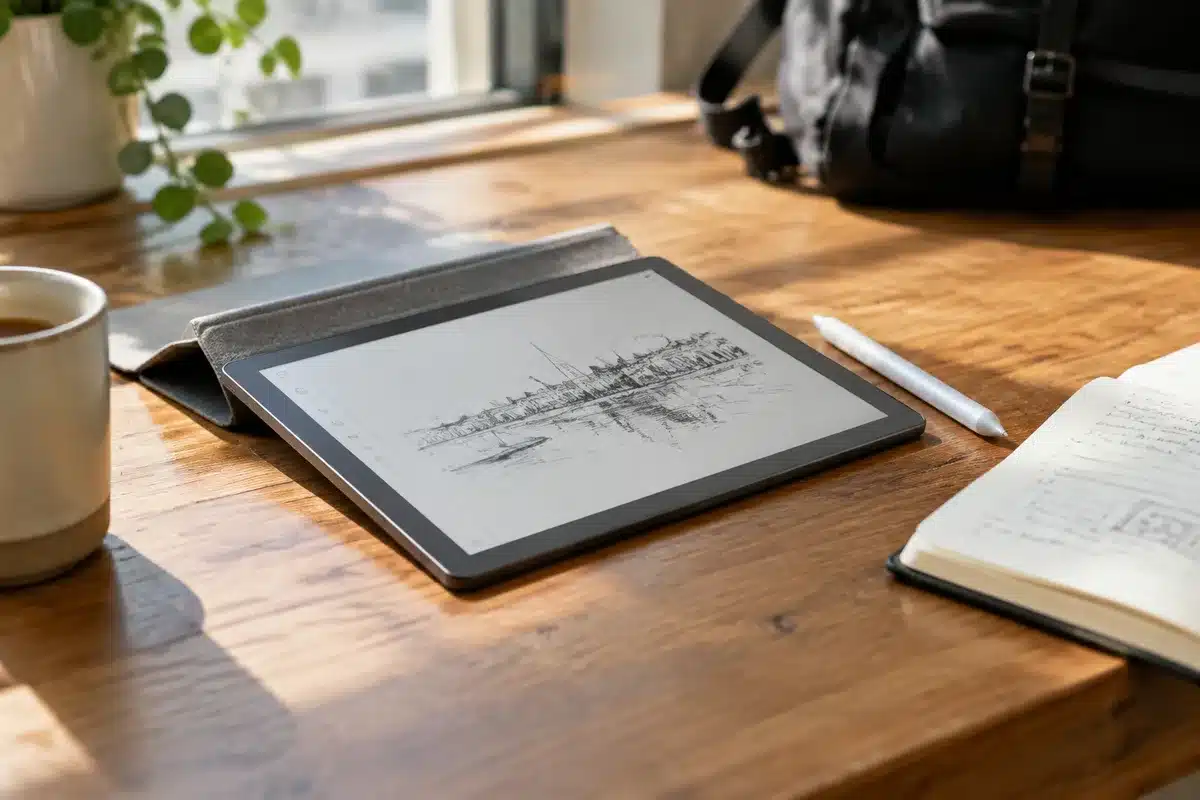
And I haven’t grabbed any other tablet since I started using it
Scientists confirm: This is the most effective way to get your cat’s attention, according to new research
Elderly Couple Refuses Reserved Seats—Viral Train Standoff Sparks Fiery Debate on Courtesy
When my phone’s screen is too small for a job, I usually reach for a tablet. But unless you charge those things every night like clockwork, they often greet you as a dead slab of electronics — useful only as a paperweight. I’ve tried a wide range of tablets over the years, from compact gaming-focused slates to oversized 14-inch models that felt more like clipboards than portable devices. Yet almost every one of them eventually suffered from the same problem: batteries that drained too fast. Only one device I’ve used truly addressed that issue.
For a while, Google’s Pixel Tablet — with its magnetic charging dock that let you leave the device powered up and ready all the time — seemed to set a new bar. Then Google pulled the plug on the Pixel Tablet and, surprisingly, no other brand followed that dock-centric approach. If you can’t keep a tablet permanently docked, the best alternative is a device that’s engineered to sip power and keep functioning for long stretches. After trying TCL’s feature-rich NXTPAPER line, I recently spent time with the new TCL Note A1, a tablet built specifically for reading, writing, and note-taking that ships with a T-Pen Pro stylus.
After three weeks with the Note A1, it’s the tablet I reach for at my desk and the one I toss into my bag when I head out. If you’ve been eyeing productivity-first slates from reMarkable, Boox, or the Kindle Scribe, here’s why the TCL Note A1 should be on your shortlist.
A focus on the screen
The Note A1 I received arrived in a two-part box: one side held the tablet, the T-Pen Pro, spare pen tips, and a charging cable; the other contained a magnetic flip cover. The inner lid of the box carried a short maxim that sums up the device’s intent: simplicity over clutter. That sentiment is reflected throughout the design.
Measuring about 10.24 x 7.74 x 0.22 inches, the Note A1 offers an 11.5-inch display in an incredibly thin frame. Weighing roughly 500 grams (just over a pound), it’s built to be carried anywhere — light enough to not feel like a chore. TCL didn’t chase ultra-thin bezels around every edge: the left bezel is noticeably wider (around three-quarters of an inch), much like the original Kindle Scribe. That extra margin makes it easier to hold in your left hand while writing, and it houses a home button that doubles as a fingerprint reader — a welcome addition that sets it apart from other NXTPAPER models.
There are few ports and buttons: a power button on the top left and a USB-C port near the bottom right for charging. The off-center USB-C placement seems intentional; it lets you attach TCL’s optional keyboard case and plug a cable in without it dangling from the middle of the device. You won’t find a physical volume rocker — the Note A1 wasn’t designed primarily as a media tablet.
On the back, you’ll notice small circular magnets in three corners, covered in soft-touch plastic, plus a 13 MP camera and a set of pogo pins for the keyboard accessory. The chassis is made from aerospace-grade aluminum. The magnets make attaching the cover easy and also help keep the rear free of scratches.
TCL didn’t skimp on the internals either. Inside sits a power-efficient MediaTek Helio G100 processor, backed by 8GB of RAM and 256GB of storage. Despite being only a hair over 5mm thin (about 0.22 inches), the tablet packs an 8,000 mAh battery with 33W fast charging. The standout, though, is the screen: an 11.5-inch NXTPAPER Pure panel with a 3:2 aspect ratio and a matte, anti-glare surface that feels very paper-like. It’s not E-Ink, but it aims to deliver comfortable long-form reading and writing without the flicker or lag associated with many e-ink displays.
Why You Should Never Reheat These Foods in the Microwave – The Hidden Dangers Experts Warn About
I tried the top 5 guard dogs—here’s what makes these breeds the ultimate protectors
I added my fingerprint and completed setup and was ready to explore what the Note A1 could do.

Not your everyday Android slate
TCL didn’t reinvent everything here — it borrowed the best elements of its NXTPAPER family and adapted them for a device centered on text and handwriting. The display doesn’t toggle between color and monochrome modes like some other NXTPAPER models, but it still provides that matte, paper-like appearance that makes reading books and documents easy on the eyes.
The Note A1 isn’t monochrome-only either; you’ll find touches of color in the user interface and you can view photos or watch videos when you want. The panel is flicker-free and refreshes at 120Hz, so animations and scrolling are smooth in a way you wouldn’t expect from an e-ink-like screen.
One big difference from typical Android tablets is what greets you on first boot: the home screen is built around notes. Instead of a standard launcher, the device opens into a hub for your documents and notebooks, with a prominent plus icon for creating new entries. Under the hood the Note A1 runs Android, and TCL’s lightweight skin is obvious in the settings and preinstalled apps. Interestingly, the OS build number isn’t exposed in the same way many Android devices do, and tapping the build number doesn’t open developer options as it normally would on other phones and tablets.
The pared-down launcher takes some getting used to, but I grew to appreciate how it discourages doom-scrolling and keeps the device focused on productivity. TCL also bundles several AI-powered features — transcription, translation, and organizational tools — which you can disable if you prefer. One feature I liked is Inspiration Circle: press and hold the button on the T-Pen Pro, draw a circle around a note or file, and it’s added to a special Inspiration Space. It works a bit like those quick-access “Essentials” features you see on some phones.
TCL handles many of the lighter AI tasks locally on the tablet, while heavier processing is routed to the cloud through a Microsoft Azure partnership. Microsoft apps like Edge and Outlook come preinstalled, but you still have access to Google Play and can install most Android apps — a flexibility you don’t get on reMarkable’s E-Ink platform.
That said, app compatibility isn’t flawless. I could download and log into apps like Reddit, but other apps threw errors — for example, an older or incompatible build of X caused launch problems. You can sideload APKs if you know what you’re doing, but that carries the usual security caveats.
For reading comics and PDFs, the Note A1 performed well. I tried opening graphic novels directly from the home page as PDFs but had trouble with save-state behavior; the device wouldn’t remember my place. Installing a dedicated viewer (CDisplayEx) solved that, and comics looked great on the 11.5-inch 3:2 canvas.
After three weeks of reading, note-taking, checking email and Slack, and catching up on the news, I came away impressed by how TCL simplified Android into a distraction-resistant tablet experience.
A tablet you’ll want nearby
Like I usually do when testing a tablet, I kept the Note A1 on my desk within easy reach. What surprised me was how long it lasted between charges. Over three weeks of daily use, it never completely died. After leaving it idle for several days the lowest I saw the battery drop was about 30 percent.
As I write this late on a Friday, I charged it earlier in the week before going out and it’s still at about 70 percent. The large 8,000 mAh battery obviously helps, but a lot of the endurance seems tied to how the tablet manages idle time — it goes into an efficient Standby Mode when left unused for longer stretches.
If you want a tablet primarily for bingeing YouTube or gaming, the Note A1 isn’t the best pick — a budget media tablet suits streaming better, and a dedicated gaming slate such as RedMagic Astra 2 is more appropriate for heavy-duty play. The Note A1 can handle video, but it lacks physical volume buttons, so adjusting sound via the Quick Settings takes a little more effort.
Where the Note A1 shines is as a thin, lightweight, eye-friendly device for note-taking and reading — and it costs less than an iPad Air. It’s exactly what its name promises: a handy note-focused slate that includes a stylus for jotting down ideas, brainstorming, and annotating documents.
After using it daily, I honestly haven’t reached for another tablet. The combination of a comfortable, paper-like screen, long battery life, a focused UI, and the bundled stylus make the TCL Note A1 a strong contender for anyone who prioritizes reading and writing over media consumption or heavy multitasking.
Follow Tom’s Guide on Google News and add us as a preferred source to get our latest reviews and coverage in your feed.
Similar Posts
- Swap Your iPad and Kindle for This E-Reader with Paper-Feel Screen: Now Up to 39% Off This Prime Day!
- Discover the Unexpected: How a Massive 14-Inch Tablet Changed My Mind About Size
- Best Back-to-School Tablet Deals 2023: Top Picks From iPad, Samsung, and Microsoft Starting at $209!
- August 2026’s Top Tablet Deals: Gear Up for Back-to-School Now!
- OnePlus Pad 3 Review: Why It’s Time to Switch from Your iPad!

Tobias Nguyen covers mobile technology and social media trends. He combines a background in digital marketing with a passion for emerging tech to provide readers with data-driven insights and practical tech usage tips.