↓

Touch Reviews

iPhone, iPad Games, Apps, Reviews, News

Skip to primary content
Skip to secondary content
  • Home
  • Request Review
  • Advertise
    • Site Skin
  • Contact
  • About Us
    • Join Touch Reviews Team
      • iOS App Reviewer
      • News Contributor

Post navigation

← Facebook Updates iPhone App Adds iOS 4 Fast App Switching
iPhone 4: Initial Impressions Part 2 (iMovie, Gyroscope, Location Awareness, Glass Case) →

How to turn off Gmail Archive feature in iOS 4

Posted on June 30, 2010 by Ravin Mohindru
Follow @Touch_Reviews

iOS 4 brings many improvements to the Mail app for iPhone and iPod touch. The main enhancements include unified inbox, organize messages by threads, open attachments in third-party apps and more.

If you use Gmail account on your device then you might have noticed that after iOS 4 upgrade when you try to swipe to delete an email when accessing the mail from the “Inboxes” listed then instead of deleting the email (moving to trash) now your iPhone will “Archive” it (Save deleted messages in your All Mail folder)

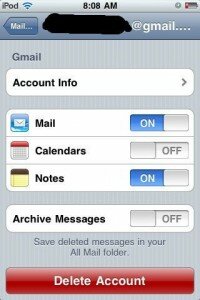
Gmail Archive iOS 4The new archive feature is automatically turned on after you have upgraded to iOS 4. If you prefer to keep the old settings and would like to delete the email instead of archiving it then you would need to change the settings for your mail account.

Go to settings option on your iPhone / iPod touch then tap “Mail, Contacts, Calendars”. Here you’ll notice your email accounts listed. Select the Gmail account for which you want to change the setting and then at the bottom of the page you’ll notice an option for “Archive Messages” You can turn this “OFF” in order to stop using the new archive feature.

Share this:

  • More
  • Pin It
  • Email
  • Share on Tumblr
  • Digg
Posted in iOS 4, Tips & Tricks Tagged Delete emails Gmail, gmail account, Gmail Archive, Gmail iPhone, iOS, iOS 4, iOS 4 Gmail archive, iPhone, mail folder, Turn off gmail archive permalink

Post navigation

← Facebook Updates iPhone App Adds iOS 4 Fast App Switching
iPhone 4: Initial Impressions Part 2 (iMovie, Gyroscope, Location Awareness, Glass Case) →

Facebook Activity

Enter your email address to subscribe to Touch Reviews and receive notifications of new posts by email.

Join 19 other subscribers

Hot Apps

Recent Posts

  • iPhone 5S Release Date Near As Sharp Begins Display Production?
  • Apple Products Coming to US Cellular This Year
  • Apple Inc. (AAPL) Saves $9.2 Billion In Taxes By Raising Corporate Debt
  • Apple’s App Store about to hit 50 billion downloads
  • iOS 7 Release Date on Schedule As Apple Adds More Engineers
  • iOS 7 to Boost In-Car Integration of Apple Maps and Siri
  • iOS 7 to Feature ‘Flat Design’ Under Jony Ive’s Leadership

Recent Reviews

  • Bastion
  • Blast A Way
  • Daniel Tiger’s Neighborhood: Play at Home with Daniel
  • Lost Cities
  • Dumbo: Disney Classics

Top Posts

  • Request Review
  • WWDC 2013 Keynote To Feature Launch of Next Gen MacBook Pro Models?
  • 7 Best iPhone Apps to Help You Eat Healthy and Diet
  • Camera Plus Pro for iPhone 4. The Best All-In-One Camera App Updated
  • Contact
  • iPhone 5 to Use Gorilla Glass 2. "Smart Case" for iPad 3?
  • New iPod touch 4G (4th gen) First Impressions

Join Our Team

Touch Reviews Writers Wanted
iPhone Quality Index

RSS Link

RSS Feed

About Touch Reviews

Touch Reviews is daily Apple news and iPhone / iPad game reviews publisher. From the latest in the world of Apple to the best iPhone or iPad app, our team works hard to bring you up-to date coverage.

Touch Reviews has been covering iOS apps and games since February 2009. Our aim is to help users decide their next purchase from the App Store.

© 2013 - Touch Reviews
↑
loading Cancel
Post was not sent - check your email addresses!
Email check failed, please try again
Sorry, your blog cannot share posts by email.